Editing product photos, removing unwanted objects, and preparing images for websites can take time, especially when each picture requires several manual adjustments.
AI-powered image editors aim to simplify these tasks. Instead of manually selecting every object or rebuilding a background from scratch, users can rely on automated tools to modify selected areas, improve image appearance, and create alternative visual compositions.
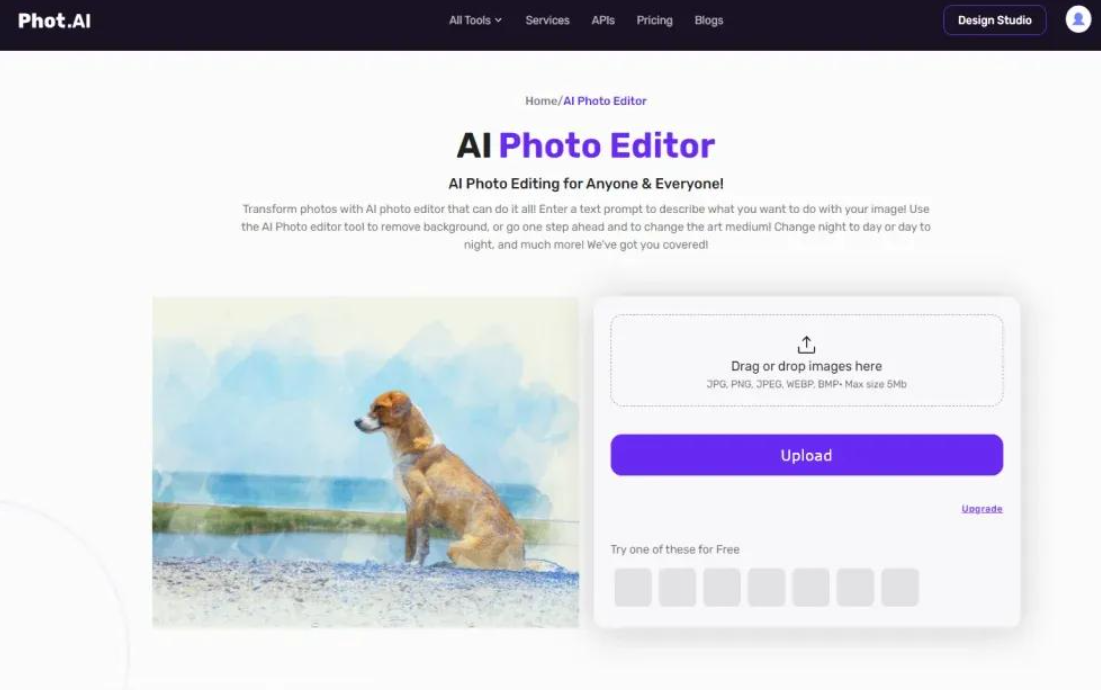
Phot.AI is an online image editing platform that focuses on these AI-assisted workflows. Its tools cover tasks such as background removal, object editing, generative image modification, image enhancement, and photo restoration.
But is Phot.AI a useful choice for everyday image processing? Can it help online sellers and content creators work more efficiently, and what should users consider before relying on it?
In this review, we examine Phot.AI’s main capabilities, practical use cases, advantages, limitations, and the situations in which a traditional image editor may be a better choice.
1. What Is Phot.AI?
Phot.AI is an AI-powered image editing platform designed to help users modify photographs and create visual content through online tools.
Rather than focusing exclusively on traditional manual editing, the platform emphasizes automated operations that can simplify common image-processing tasks.
Depending on the tools available, users can work on operations such as removing backgrounds, modifying image elements, improving image quality, expanding compositions, and restoring older photographs.
These capabilities can be useful for people who need to prepare images but do not want to learn a complicated professional editing workflow.
Potential users include:
- E-commerce sellers preparing product photographs.
- Bloggers creating images for articles.
- Digital marketers developing promotional graphics.
- Social media creators preparing visual content.
- Small businesses that need consistent product images.
- Individuals interested in improving personal photographs.
One important consideration is that Phot.AI is an online service. Available features, usage limits, export options, and pricing may change over time.
Before choosing it for regular work, users should check the current product information and confirm that the tools they need are included in the available plan.
2. Main Features of Phot.AI
AI Background Removal
Background removal is a common requirement in product photography, online retail, and graphic design.
Phot.AI provides AI-assisted background removal designed to separate the main subject from its surroundings.
This can help users prepare images for product listings, promotional materials, profile pictures, and website graphics.
For example, a small online seller might photograph a product on a desk. The original background may contain distracting objects or colors that do not match the store’s visual style.
A background removal tool can help separate the product from its surroundings, making it easier to place the subject against a simpler background.
However, the quality of the result depends on the image.
Fine hair, transparent objects, reflective surfaces, and subjects with colors similar to their backgrounds can make accurate separation more difficult.
For commercial use, inspect the edges carefully before publishing the edited image. A clean background is useful, but visible cutout errors can make a product photograph look less professional.
AI Object Removal
Unwanted objects can distract from the main subject of a photograph.
Phot.AI offers AI-assisted editing tools designed to remove selected elements from images and reconstruct the affected areas.
Potential uses include cleaning up background distractions, removing unwanted objects from personal photographs, and improving the appearance of selected visual elements.
Consider a product photograph with an unrelated object near the edge of the frame. Removing that object may help create a cleaner composition without requiring a complete redesign.
The challenge is that removing an object involves more than deleting pixels. The software must also generate plausible content to fill the area.
Results can vary depending on the background’s complexity, lighting, texture, and the size of the selected object.
A small object against a plain wall is generally easier to remove convincingly than a large object covering a patterned surface.
Users should review the edited image at full size to check for unnatural textures, repeated patterns, or incomplete corrections.
AI Object Replacement and Generative Editing
Some image-editing tasks require more than removing an unwanted element.
For example, a marketer may want to change an object in a promotional image, experiment with a different visual concept, or adapt an existing picture for a new campaign.
Phot.AI’s AI-oriented editing approach includes tools for modifying image content and creating alternative visual results.
Generative editing can help users explore different ideas without manually rebuilding every part of a composition.
However, generated results should not be treated as exact photographic reconstructions.
AI-generated changes may alter small details, introduce unexpected textures, or produce objects that do not match the original image perfectly.
This distinction is especially important when editing product photographs, technical images, or other visuals where accuracy matters.
For creative projects, generated variations can be useful starting points. For factual or commercial images, users should verify that the final result remains appropriate for its intended purpose.
Generative Fill and Image Expansion
Generative editing can also help users modify the composition of an image.
Image expansion is particularly relevant when an existing photograph does not fit the dimensions required by a website, advertisement, or social media layout.
Traditional cropping removes part of an image. Generative expansion takes a different approach by extending the canvas and creating additional visual content around the original picture.
For example, a photograph might be too narrow for a promotional banner. Expanding the image may create additional background space around the subject.
This can make it easier to adapt existing visual assets to different layouts.
However, the newly generated areas may not perfectly match the original scene.
Users should inspect extended backgrounds, shadows, architectural details, and other recognizable elements to ensure the result looks consistent.
The exact availability of generative fill and expansion tools should be confirmed on Phot.AI’s current official website.
AI Image Enhancement and Upscaling
Image enhancement tools are designed to improve the appearance of photographs.
Phot.AI offers image-processing capabilities associated with improving image quality and increasing resolution.
These tools may be useful when an image appears soft, has limited detail, or needs to be displayed at a larger size.
For example, a website owner may have an older image that looks less clear than the rest of the photographs on a page. AI enhancement may help improve its perceived sharpness.
However, AI upscaling has important limitations.
Increasing an image’s resolution does not guarantee that the software can recover genuine details that were never captured. Some tools generate plausible-looking details rather than reconstructing the original scene exactly.
For this reason, enhanced images should be checked carefully before professional printing or commercial publication.
If the image contains text, product labels, logos, or other details that must remain accurate, verify those elements against the original file.
Photo Restoration
Older photographs may suffer from fading, low contrast, discoloration, or visible damage.
AI-assisted restoration tools can help users improve the appearance of these images and, where supported, experiment with colorization.
This can be useful for personal photo collections, family archives, and historical images.
For example, someone might want to improve an old photograph before sharing it with relatives or including it in a personal project.
The final result depends heavily on the condition of the original image.
Severely damaged photographs may contain too little information for an automated tool to reconstruct every detail reliably. Colorization can also introduce colors that were not present in the original.
For historical or documentary material, preserve the original image and distinguish AI-generated restoration from the original photograph.
3. Advantages of Phot.AI
Phot.AI has several potential advantages for users who regularly work with digital images.
AI-assisted editing workflows. Automated tools can simplify operations such as removing unwanted objects, separating subjects from backgrounds, and modifying image compositions.
Convenient online access. A browser-based workflow can be useful for people who prefer not to install a traditional desktop editing application.
Useful for product image preparation. Background removal, image enhancement, and related tools can help sellers prepare photographs for online stores.
Creative editing options. Generative editing and image expansion can help users explore alternative compositions for promotional and social media content.
Image improvement tools. Enhancement and restoration functions provide additional options for working with lower-quality or older photographs.
Accessible for non-specialists. Users who are unfamiliar with detailed manual editing may appreciate a workflow built around specific image-processing tasks.
The main attraction is convenience. Phot.AI is worth exploring if its current toolset matches the image-processing tasks you perform regularly.
4. Potential Limitations of Phot.AI
AI-powered image editing can be useful, but it is not suitable for every situation.
AI Results Can Be Inconsistent
Automated editing tools do not always produce perfect results.
Background removal may leave rough edges. Object removal may create unnatural textures. Generative expansion may introduce visual elements that do not match the original scene.
These problems are more noticeable in complicated images containing fine details, overlapping objects, reflections, or intricate patterns.
Users should treat AI-generated output as a result that may require inspection and correction rather than assuming every edit will be ready for publication.
Detailed Manual Control May Be Limited
AI-oriented tools are often designed to make editing tasks easier by automating part of the process.
However, users who need precise control over individual layers, masks, selections, color adjustments, and complex compositions may prefer a traditional layer-based editor.
Phot.AI may be useful for quickly preparing visual assets, but it should not automatically be considered a complete replacement for professional graphics software.
The best choice depends on the complexity of your work and the amount of manual control you require.
Free Usage and Paid Plans Need Checking
Online image editing services may offer different subscription plans, usage allowances, or restrictions on certain tools.
Before using Phot.AI regularly, check its current pricing and terms.
Important questions include:
- Which tools are available without payment?
- Are there limits on the number of edits?
- Do certain AI operations require credits?
- What export resolutions and file formats are supported?
- Are commercial-use permissions subject to particular conditions?
These details can affect whether the service is practical for a business or a user who edits images frequently.
Do not assume that every advertised feature is unlimited or included in the free offering.
Internet Access Is Part of the Workflow
Because Phot.AI is an online platform, users generally need internet access to use its web-based editing tools.
This may be convenient when working across different computers, but it can be less suitable for users who need a fully offline workflow.
Internet-dependent processing can also be a consideration when working with large image files or an unstable connection.
Privacy Matters When Uploading Images
Before uploading images to an online editing platform, consider whether the files contain sensitive personal information, confidential business details, or other material that should not be shared unnecessarily.
Review Phot.AI’s current privacy policy and terms to understand how uploaded images are processed, stored, and handled.
Do not assume that an online AI editing service processes every image entirely on your own device.
For confidential commercial images or sensitive personal photographs, confirm the applicable data-handling conditions before using the service.
5. Who Should Consider Phot.AI?
Phot.AI may be worth considering for several types of users.
E-commerce Sellers
Online sellers often need clean product photographs, consistent backgrounds, and image dimensions suitable for product listings.
AI-assisted background removal and image enhancement may help simplify some of this work.
However, edited images should accurately represent the actual product, including its color, shape, and important characteristics.
Digital Marketers
Marketing teams may need to adapt images for different campaigns, layouts, and promotional materials.
Generative editing and image expansion can help explore visual variations, provided the results are reviewed before publication.
Bloggers and Website Owners
Website publishers frequently resize images, remove distractions, and prepare visual assets for articles.
Phot.AI may be useful when its available tools match these recurring needs.
Social Media Creators
Creators who regularly prepare promotional images or personal visual content may appreciate having several AI-assisted editing functions available through an online service.
Users Restoring Personal Photographs
People who want to improve older images may find restoration-related tools worth exploring.
Results should still be checked carefully, especially when preserving historical accuracy matters.
Phot.AI may be less suitable for users who require precise manual editing, a fully offline workflow, or extensive control over complex image compositions.
6. Phot.AI for E-Commerce: A Practical Example
One useful way to evaluate an image editor is to consider how it might fit into a real workflow.
Imagine a small online shop preparing photographs for a new product listing.
The owner has several images that need to be prepared before publication.
Step 1: Remove distracting backgrounds.
Background removal can help separate the product from its original surroundings and create a cleaner presentation.
Step 2: Improve image appearance.
If a photograph appears soft or lacks clarity, an enhancement tool may help improve its visual presentation.
Step 3: Remove unwanted elements.
Objects that distract from the product may be removed when doing so does not change important product information.
Step 4: Adapt the composition.
Image expansion or other generative tools may help create a layout that fits a particular promotional format.
Step 5: Review the final images.
The seller should compare the edited photographs with the originals and confirm that important product details remain accurate.
This workflow illustrates where Phot.AI may be useful: it can help simplify several image-processing tasks without requiring every operation to be performed manually.
However, automation does not eliminate the need for quality control. The final image should still be checked for visual errors and accuracy.
7. Phot.AI vs. Traditional Image Editing Software
Phot.AI and traditional graphics editors approach image editing differently.
AI-focused services emphasize automated operations and simplified workflows. Traditional layer-based editors generally provide more direct control over individual image elements.
| Comparison point | Phot.AI | Traditional layer-based editor |
|---|---|---|
| Main approach | AI-assisted image editing | Manual and automated editing tools |
| Background removal | Offers AI-oriented background tools | Often uses selections, masks, and other tools |
| Object removal | AI-assisted editing | May offer manual retouching and automated removal |
| Generative editing | Depends on available tools and plans | Varies by application |
| Detailed layer control | Depends on the service’s capabilities | Often a core part of the workflow |
| Offline use | Browser-based workflow generally requires internet access | Depends on the application |
| Best suited for | Convenient AI-assisted image processing | Users who need detailed editing control |
This is a general comparison rather than a direct performance test.
Some traditional editors also provide powerful AI tools, while other applications focus mainly on manual editing.
If you need to remove backgrounds and prepare images quickly, an AI-focused service may be convenient. If your work requires detailed control over every element of a composition, a more comprehensive editor may be preferable.
8. What to Check Before Choosing Phot.AI
Before committing to Phot.AI for regular image editing, consider the following questions.
1. Does it support your main editing tasks?
Identify the operations you need most often, such as background removal, object editing, enhancement, or image expansion.
2. Are the required tools included in your plan?
Check the current pricing, usage limits, export options, and any credit requirements before paying.
3. Are the results accurate enough for your work?
Test the relevant tools with representative images and inspect the output carefully.
4. Are you comfortable uploading your images?
Review the platform’s privacy policy and terms before processing sensitive personal or commercial material.
5. Do you need more detailed editing control?
If you regularly work with complex compositions, layers, and precise manual adjustments, compare Phot.AI with a traditional graphics editor.
6. Can you use the results for your intended purpose?
For commercial projects, check the current terms and ensure that the images and generated elements can be used as intended.
These checks can help you determine whether Phot.AI fits your workflow rather than choosing it solely because it offers AI features.
9. Frequently Asked Questions
What is Phot.AI used for?
Phot.AI is an AI-powered image editing platform designed to help users modify photographs and prepare visual content. Its advertised tools include background removal, object editing, image enhancement, generative editing, and restoration-related functions.
Can Phot.AI remove image backgrounds?
Phot.AI offers background removal functionality designed to separate a subject from its surroundings. Results depend on the image, particularly the complexity of the background and the edges of the subject.
Can Phot.AI remove unwanted objects?
Its AI-oriented editing tools are designed to help remove selected unwanted elements from images. Users should inspect the result for unnatural textures or incomplete corrections.
Can Phot.AI improve image quality?
Phot.AI offers image enhancement-related tools. These may improve the appearance of some images, but results vary, and AI processing cannot guarantee accurate recovery of details missing from the original file.
Is Phot.AI suitable for e-commerce?
It may be useful for preparing product images through background removal, image enhancement, and other editing operations. However, sellers should ensure that edited images accurately represent their actual products.
Is Phot.AI free?
Pricing, free usage limits, and available tools can change. Check the official website for current plans and terms before choosing a subscription.
Does Phot.AI require installation?
Phot.AI provides online image editing tools, allowing users to access supported functions through its website rather than relying exclusively on a traditional desktop installation.
Is Phot.AI a replacement for professional image editing software?
That depends on the workflow. It may be convenient for automated image-processing tasks, but users who need detailed manual control over layers, masks, and complex compositions may still require a traditional graphics editor.
10. Final Verdict: Is Phot.AI Worth Trying?
Phot.AI is worth exploring if you want an online platform focused on AI-assisted image editing.
Its advertised capabilities cover several practical tasks, including background removal, object editing, image enhancement, generative modification, and photo restoration.
These functions may be useful for e-commerce sellers, bloggers, marketers, and content creators who regularly prepare visual material.
However, AI editing is not always predictable. Results may require manual correction, subscription conditions should be checked before regular use, and privacy considerations matter when uploading images to an online service.
Overall, Phot.AI may be a useful option for people who want to simplify everyday image editing through AI-assisted tools. Whether it is the right choice depends on your editing requirements, budget, privacy needs, and the amount of control you expect from your software.
Official Website: https://www.phot.ai/
Review Methodology: This article summarizes publicly available product information and describes potential use cases for AI image editing tools. It does not claim hands-on testing or independent performance benchmarking. Features, pricing, usage limits, and terms may change, so readers should confirm current details on the official website.