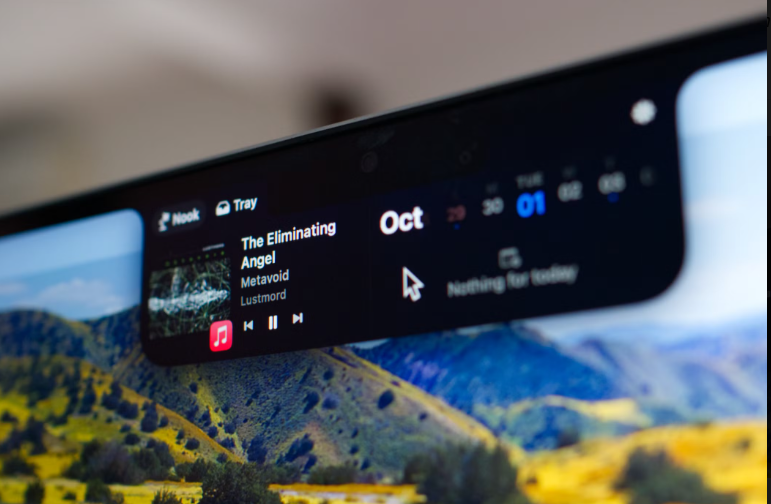
When Apple introduced the notched MacBook display, the internet did what it does best: complain for two years, then build an entire software category around the offending black rectangle. September 25, 2026 marked the latest entry — NotchPop, a Mac utility that transforms the MacBook notch into a Dynamic Island-style interactive widget area, launched on Product Hunt and immediately caught the Mac community’s attention.
What Is NotchPop?
NotchPop belongs to the “notch utility” category — apps that treat the MacBook’s camera cutout not as dead space, but as a persistent, glanceable control surface in the one place your eyes already are. Think of the iPhone’s Dynamic Island: a small black pill that expands fluidly to show live activities, media controls, and timely information.
NotchPop’s pitch is simple: hover or click the notch, and it pops open into a widget panel — music controls, timers, system stats, clipboard tools, and more — without ever opening a window or touching your dock.
Why the Notch Category Is Booming Right Now
NotchPop didn’t launch into a vacuum. The category has matured fast in 2026:
- Notchy (notchy.dev) — free forever, 100% native SwiftUI, with an almost absurd feature list: music controls, clipboard history, Pomodoro timer, file shelf, AI usage tracking for Claude Code and Cursor, even face unlock. Completely donation-funded.
- Boring Notch — free and open source (5,000+ GitHub stars), focused on media controls and a file shelf.
- NotchNook — $25 one-time (or $3/month), widget-driven, with a clever file “tray” you can drag items into.
- Alcove — $17 one-time, strong on notch visuals and media.
- Seam — $19.90 one-time, adds offline voice typing via on-device Whisper.
NotchPop enters this field with a widget-first philosophy: rather than replacing a dozen menu bar apps (Notchy’s angle), it focuses on making the notch itself a pop-open surface for the information you check a hundred times a day.
Early Impressions
What works:
- 🎯 The core interaction — hover to peek, click to expand — feels instantly natural
- 🧩 A widget-first layout is more approachable than the “replace 15 apps” pitch of some competitors
- 💨 Native feel matters here; the good apps in this category idle near 0% CPU
What’s still unknown:
- ⚠️ Feature depth vs. the free and established competition — Notchy in particular is a very high bar at $0
- ⚠️ Pricing hasn’t been widely published yet; the category’s emotional anchor is “this should be cheap or free”
- ⚠️ Long-term maintenance — notch apps live and die on macOS update compatibility
The Honest Buying Advice
If you’re notch-curious in 2026, the decision tree is simple:
|
You want… |
Try |
|---|---|
|
Free, everything, forever |
Notchy |
|
Open source |
Boring Notch |
|
Voice typing in the notch |
Seam |
|
Widgets + file tray |
NotchNook |
|
The newest take |
NotchPop |
Final Verdict
NotchPop is a fresh, focused take on a category that’s quietly becoming essential Mac software. Whether it survives against free, feature-dense incumbents depends on execution and pricing — but as a sign of where Mac utilities are heading (toward glanceable, ambient, zero-window interfaces), it’s absolutely worth watching.
————————————————————————————————————————————————————————————
Have you given your notch a job yet? Which notch app are you running — or is this whole category a solution in search of a problem?