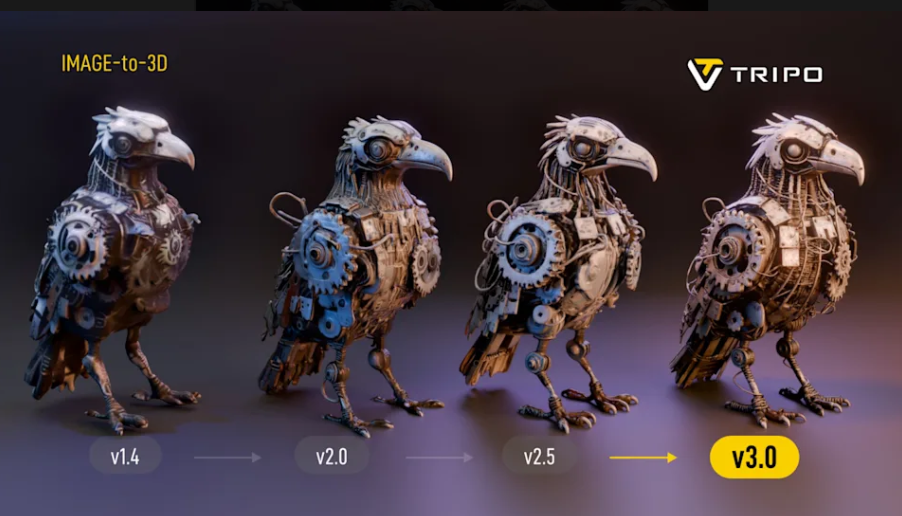
AI-powered 3D modeling tools are changing how creators design digital assets. Instead of building every model manually, users can now turn text prompts and reference images into 3D objects with the help of artificial intelligence.
Tripo AI is one of the platforms exploring this approach. It offers AI-powered 3D generation, model processing, texturing, mesh optimization, and other tools designed to support different stages of the 3D creation workflow.
But is Tripo AI suitable for professional projects? How much does it cost, what can you do with the free plan, and how does it compare with other AI 3D generators?
In this Tripo AI review, we examine its main features, pricing structure, potential advantages, limitations, privacy considerations, and practical use cases. We also explain what to check before choosing a subscription.
Quick Verdict: Tripo AI is worth considering if you want to generate 3D assets from text or images and reduce some of the repetitive work involved in 3D production. Its usefulness depends on the complexity of your project, the quality of the generated geometry, your required export formats, and the amount of manual editing you are prepared to do. Beginners can start with the free plan, while commercial users should carefully review the current subscription terms and licensing conditions.
1. What Is Tripo AI?
Tripo AI is an AI-powered 3D creation platform developed by VAST. Its tools are designed to transform text descriptions and images into 3D models and support additional processing tasks.
Traditional 3D modeling often requires users to create geometry, adjust materials, unwrap UVs, and prepare assets for their intended applications. AI-assisted generation can simplify parts of this process, particularly during early design and prototyping.
Tripo AI provides two main ways to work with its technology:
- Tripo Studio: A web-based workspace for generating and processing 3D assets.
- Tripo API: A developer-oriented service for integrating 3D generation and related operations into applications and automated workflows.
These products serve different needs. Studio is aimed at users who want to create assets through a graphical interface, while the API is designed for developers who need programmatic access to generation and processing capabilities.
Potential applications include game prototyping, product visualization, concept development, animation, educational projects, and 3D printing preparation.
However, an AI-generated model is not automatically ready for every production environment. Geometry, textures, dimensions, materials, and other technical details may still require review and adjustment.
2. Key Features of Tripo AI
Tripo AI combines several AI-assisted capabilities in one workflow. The availability of specific features depends on the product, model version, and subscription plan.
2.1 Text-to-3D Generation
Text-to-3D generation allows users to describe an object and use that description to create a corresponding 3D model.
For example, a user might request a stylized fantasy sword, a low-poly tree, or a futuristic vehicle.
This approach can be useful when exploring visual concepts or creating initial assets without modeling everything manually.
The quality of the result depends on the prompt, object complexity, model capabilities, and desired visual style.
Simple objects may require relatively little correction, while complex mechanical designs, articulated characters, and objects with precise dimensions may need substantial additional work.
2.2 Image-to-3D Generation
Image-to-3D generation converts a reference image into a three-dimensional asset.
This feature can help creators produce an initial model from a product image, character illustration, concept drawing, or other suitable visual reference.
A single image does not show every side of an object. As a result, the generated model may contain inaccurate or incomplete geometry on surfaces that are not visible in the reference.
For important assets, inspect the model from multiple angles before using it in a project.
2.3 Multi-View to 3D
Multi-view generation uses multiple views of an object to provide additional visual information.
When suitable reference images are available, multiple viewpoints can help communicate the object’s shape more clearly than a single image.
This can be particularly useful when the back, sides, or other structural details matter.
However, the quality of the source images and their consistency remain important. Different views should represent the same object and provide reasonably clear information about its shape.
2.4 Textures and Materials
Textures help determine how a 3D model looks, including its colors, surface details, and material appearance.
Tripo AI provides texture-related generation and editing capabilities. Depending on the selected plan and available tools, users may have access to different texture resolutions and processing options.
For projects that require realistic materials, evaluate the resulting textures rather than relying solely on marketing claims about resolution.
Higher-resolution textures do not automatically produce better geometry or a more accurate model.
For game development and visualization, check whether the generated materials work correctly in your intended rendering environment.
2.5 Smart Mesh and Retopology
Mesh processing is important because AI-generated geometry may not always have the structure required by a particular production pipeline.
Retopology and mesh optimization can help adjust geometry for editing, rendering, animation, or real-time applications.
Tripo AI offers mesh-related processing features, including Smart Mesh functionality on supported plans.
Before using a processed model in production, inspect its polygon count, surface quality, topology, and compatibility with your target software.
A mesh that looks acceptable in a preview may still need additional optimization before it can be used efficiently in a game engine or animation project.
2.6 Segmentation and Model Editing
Segmentation divides a model into separate components or regions.
This can make certain editing workflows easier when different parts of an object need to be adjusted independently.
For example, a creator might want to separate the body and accessories of a character or isolate components of a product model.
The practical benefit depends on how accurately the system separates the model and whether the resulting parts can be edited as required.
2.7 Auto-Rigging and Animation
Rigging prepares a 3D model for movement by creating or assigning a skeletal structure.
Automated rigging can reduce some of the manual work involved in preparing suitable models for animation.
However, not every generated object is appropriate for automatic rigging. Characters with unusual proportions, complicated structures, or nonstandard joints may need manual corrections.
Before using an automatically rigged character, check its skeleton, deformation, joint placement, and movement quality.
2.8 Export Formats and Workflow Integration
Export compatibility is important when moving generated assets into another application.
Tripo AI supports several common 3D asset formats, with availability depending on the specific workflow and product configuration. Formats documented across its ecosystem include GLB, FBX, OBJ, and USD-based options.
If you intend to use the model for 3D printing, confirm that the selected workflow supports a suitable format, such as STL or 3MF, and that the exported geometry meets your printer’s requirements.
For game development, animation, or product design, check the precise export options available in your plan rather than assuming every format is available in every situation.
3. Tripo AI Pricing: Free Plan, Pro, Max, and Team
Tripo AI uses different pricing structures for Tripo Studio and the Tripo API.
Studio subscriptions provide monthly credits and access to features according to the selected plan. The API uses a separate usage-based billing model.
This distinction matters because the most suitable option depends on whether you create assets manually through the website or generate them programmatically.
Tripo Studio Pricing
The following table reflects the USD pricing displayed on Tripo AI’s official pricing page when checked in October 2026.
| Plan | Monthly Price | Monthly Credits | Best Suited For |
|---|---|---|---|
| Free | $0 | 200 | Exploring the platform and testing basic workflows |
| Pro | $20 monthly, or $20 per month when billed annually | 3,000 | Regular individual creators |
| Max | $90 monthly, or $90 per month when billed annually | 25,000 | Heavy users and professional workflows |
| Team | $110 per seat monthly, or $55 per seat per month when billed annually | 30,000 per seat | Teams and studios |
Important: Prices, credit allowances, included features, and billing conditions can change. Check the official pricing page before purchasing. Annual billing requires a longer-term commitment, and its total payment differs from the monthly equivalent shown above.
The official pricing page also describes differences in concurrent tasks, queue priority, model privacy, export allowances, batch generation, and advanced processing features.
Do not choose a subscription based only on its advertised number of credits. Consider how many usable models you expect to generate, how often you need to retry tasks, and which features your workflow actually requires.
What Does the Free Plan Include?
The Free plan provides a way to explore Tripo AI without paying for a subscription.
It is useful for understanding the interface, testing prompts, and evaluating whether AI-generated 3D assets fit your needs.
However, free access comes with limitations. These can include monthly credit restrictions, limited concurrency, export restrictions, and different model privacy or usage rights.
If you intend to use generated assets commercially, review the current terms before using free-plan outputs in paid work.
Is Tripo Pro Worth Paying For?
Pro may be worth considering if you regularly generate assets and need more credits, higher task concurrency, additional processing tools, or commercial-use permissions.
For occasional experimentation, a free account may be sufficient.
For professional projects, estimate your expected monthly workload before upgrading. If you generate only a few models, a larger credit allowance may not justify the additional cost.
What About Tripo Max and Team?
Max is intended for users with heavier generation requirements and more demanding workflows.
Team is designed for collaborative environments that may need shared resources, centralized billing, and administrative features.
These plans are not automatically better for every user. Their value depends on how much work you perform, whether multiple people need access, and whether the additional features reduce meaningful operational costs.
How Is Tripo API Pricing Different?
Tripo API is a separate developer product rather than an extension of the Studio subscription price.
Its billing is based on API usage and the specific operations performed. Different generation, texturing, processing, and animation tasks can consume different amounts of credits.
Developers should review the API pricing documentation and estimate the cost of their intended workflow before integrating the service into an application.
If you are building an application for other users, also consider retries, failed tasks, peak demand, storage, and ongoing maintenance when calculating total operating costs.
4. Pros and Cons of Tripo AI
Tripo AI offers several potential benefits, but its suitability depends on the complexity of the work and the level of control required.
Pros
1. Faster initial asset creation
Text-to-3D and image-to-3D generation can help users create initial models without building every component manually.
2. Multiple creation methods
Text prompts, reference images, and multi-view inputs provide different ways to begin the modeling process.
3. Additional processing tools
Mesh processing, texturing, segmentation, and related capabilities can reduce the need to move between multiple tools for every operation.
4. Useful for prototyping
Creators can use generated models to explore visual ideas, test concepts, and prepare preliminary assets for further development.
5. Options for developers
The separate API allows developers to investigate automated generation and processing workflows.
6. A free starting point
The Free plan provides an opportunity to evaluate the platform before committing to a paid subscription.
Cons
1. Results may need manual cleanup
Generated geometry, textures, and materials may not meet every production requirement.
2. Single-image reconstruction has limitations
A single reference image cannot fully describe the unseen sides and internal structure of an object.
3. Credits require careful management
Heavy use, repeated attempts, and additional processing can increase the effective cost of producing a usable asset.
4. Commercial rights require attention
Usage rights differ according to the applicable terms and plan. Users should confirm the rights associated with their intended use.
5. Advanced features may require a paid plan
Some workflows, export options, or processing capabilities may be limited by subscription level.
6. Cloud dependence
Tripo AI is a cloud-based service. Users should consider internet access, service availability, upload requirements, and data-handling policies when planning their workflow.
5. Is Tripo AI Suitable for Professional Work?
Tripo AI can be useful in professional workflows, but suitability depends on what the finished asset needs to accomplish.
Game Development
Game developers can use AI-generated assets for prototypes, concept exploration, and selected production tasks.
Before importing an asset into Unity, Unreal Engine, or another engine, check its polygon count, UV layout, texture resolution, scale, pivot, materials, and performance.
A model that looks good in a web preview may still require optimization for a real-time environment.
Product Design and Visualization
Designers can use generated models to explore product concepts and create preliminary visual assets.
However, AI-generated geometry should not be treated as a substitute for dimensionally accurate CAD modeling when manufacturing tolerances and engineering specifications matter.
If the object must fit another component or meet precise measurements, validate its geometry in an appropriate professional tool.
Animation
Tripo AI’s model-generation and rigging capabilities may help with early character development and experimentation.
For final animation work, inspect the skeleton, joint placement, deformation, and compatibility with the target animation pipeline.
Characters with complex proportions may need manual adjustments.
3D Printing
AI-generated models can provide starting points for printable objects, but a visually complete model is not necessarily ready for fabrication.
Before printing, verify:
- Whether the mesh is watertight
- Whether the model contains unwanted holes or intersecting surfaces
- Whether wall thickness is appropriate
- Whether the dimensions match the intended print
- Whether the export format is suitable for your slicer
For functional parts, safety-critical components, or objects that must withstand specific loads, use appropriate engineering validation rather than relying solely on AI generation.
Education and Creative Projects
Students, hobbyists, and educators may use Tripo AI to explore 3D modeling concepts and create visual materials.
The platform can be particularly useful when the goal is to experiment with shapes and ideas rather than produce a technically perfect final asset.
6. Tripo AI vs. Meshy vs. Rodin
Tripo AI is not the only option for AI-assisted 3D creation.
Meshy and Rodin are alternative products worth evaluating, but the best choice depends on the task, the quality requirements, and the surrounding workflow.
| Comparison Factor | Tripo AI | Meshy | Rodin |
|---|---|---|---|
| Main evaluation focus | 3D generation and model-processing workflows | AI-assisted 3D asset creation | AI-powered 3D asset generation |
| Input methods | Check the current text, image, and multi-view tools | Check current text and image generation options | Check current input methods and supported workflows |
| Mesh processing | Offers mesh-related processing tools | Verify the tools available in the current plan | Verify the tools available in the current plan |
| Workflow integration | Studio and a separate API | Check available integrations and API options | Check available integrations and API options |
| Pricing | Studio subscriptions and separate API billing | Verify current plan and credit structure | Verify current plan and credit structure |
| Best selection method | Test against your target asset and pipeline | Test against the same asset and pipeline | Test against the same asset and pipeline |
This comparison is intended as a selection framework, not a claim that one platform consistently produces better results.
Features, model versions, and pricing change over time. A fair comparison should use the same input images or prompts, similar generation settings, and identical quality criteria.
When evaluating the results, consider geometry, texture quality, editing requirements, export compatibility, generation cost, and the time required to prepare each model for its intended use.
7. Privacy, Licensing, and Security Considerations
Before uploading reference images or using generated models in a commercial project, review the platform’s current privacy policy and terms of service.
This is especially important for users working with confidential product concepts, client assets, unreleased designs, or proprietary material.
Understand Model Ownership and Commercial Rights
Tripo AI’s published guidance distinguishes between Free and paid users regarding generated content and commercial-use rights.
According to its current commercial-use guidance, paid users receive broader rights to use, modify, distribute, and commercially exploit generated models, subject to the applicable terms. Free users face different restrictions.
Do not assume that a model generated through a free account automatically has the same licensing conditions as a model generated under a paid subscription.
If you intend to sell models, use them in commercial games, deliver them to clients, or manufacture physical products, review the current terms before proceeding.
Protect Confidential Reference Images
Avoid uploading sensitive CAD files, unreleased products, customer photographs, or confidential project materials until you have reviewed the service’s data-handling rules.
Check how the platform handles uploaded inputs, generated outputs, storage, and potential data use.
For work involving client confidentiality, obtain any necessary permissions and confirm that the service meets your organization’s requirements.
Be Careful With Third-Party Sellers
If a reseller offers unusually cheap Tripo subscriptions or API credits, verify the source before purchasing.
Confirm which product is included, whether the account or credits are legitimate, what usage restrictions apply, and whether support or refunds are available.
A low price does not guarantee that the offer is authorized or that it provides the access you need.
For most users, purchasing through the official service is the more straightforward way to verify the applicable plan and billing terms.
8. Who Should Use Tripo AI?
Tripo AI may be a good fit for users who want to reduce the amount of manual work involved in creating initial 3D assets.
Indie game developers: Useful for prototyping and evaluating assets before spending time on detailed production modeling.
3D artists: Worth exploring when AI-generated geometry can accelerate concept development or repetitive asset creation.
Product designers: Potentially helpful for visual exploration, provided the output is not mistaken for dimensionally accurate engineering CAD.
3D printing hobbyists: Useful for generating starting models that can be checked and repaired before fabrication.
Animation creators: Worth evaluating for initial character generation and selected rigging workflows.
Developers: The API may be relevant when integrating 3D generation into an application or automated pipeline.
Users who require exact mechanical geometry, highly controlled topology, or predictable production results should expect to combine AI generation with traditional 3D tools.
9. Frequently Asked Questions
Is Tripo AI free to use?
Yes. Tripo Studio offers a Free plan with a monthly credit allowance and feature limitations. The current allowance and restrictions should be checked on the official pricing page.
Can I use Tripo AI for commercial projects?
Commercial-use rights depend on the applicable plan and terms. Tripo AI’s published guidance provides broader commercial rights for paid users than for free users. Review the latest terms before using generated assets in paid work.
What file formats does Tripo AI support?
Tripo AI supports several common 3D formats across its ecosystem, including GLB, FBX, OBJ, and USD-based options. Other formats may be available depending on the workflow. Confirm that your chosen plan supports the format you need.
Is Tripo Studio the same as Tripo API?
No. Tripo Studio is the web-based creation environment, while Tripo API provides programmatic access to generation and processing operations. They use separate pricing structures.
Can Tripo AI create models for Unity and Unreal Engine?
AI-generated assets may be suitable for use in Unity, Unreal Engine, and other 3D environments, provided they are exported in compatible formats and meet the target application’s technical requirements.
You may still need to adjust geometry, materials, textures, scale, and performance.
Is Tripo AI suitable for 3D printing?
It can be used to create starting models for 3D printing. However, you should check mesh integrity, wall thickness, scale, and export compatibility before printing.
AI-generated geometry is not automatically suitable for manufacturing.
Is Tripo AI better than Meshy or Rodin?
There is no universal winner for every workflow. Compare the platforms using the same reference assets and evaluate geometry quality, textures, editing tools, export formats, cost, and the time needed to prepare the final model.
Does Tripo AI support API integration?
Yes. Tripo provides a separate developer API for integrating 3D generation and related processing capabilities into applications. Review the developer documentation for supported operations, authentication, and current usage costs.
Is Tripo AI suitable for beginners?
Beginners can start with the free plan and experiment with simple prompts or reference images. More advanced tasks, such as retopology, rigging, and production optimization, may require additional 3D knowledge.
Is Tripo AI worth paying for?
It may be worth paying for if the included features, credit allowance, and commercial-use rights match your workload. Test the free plan first, estimate your expected usage, and compare the total cost with alternative tools before upgrading.
10. Final Verdict: Is Tripo AI Worth Trying in 2026?
Tripo AI is worth exploring if you want to turn text descriptions or images into 3D assets and streamline parts of the modeling process.
Its combination of generation, texturing, mesh processing, and developer-oriented tools provides several possible entry points for creators with different needs.
However, AI-generated assets should not automatically be treated as finished production models. Geometry, materials, dimensions, topology, and licensing requirements still need to be evaluated.
For beginners and hobbyists, the Free plan provides a practical starting point for testing the platform.
For professional users, the decision should depend on the required features, expected monthly usage, commercial rights, and the amount of manual correction needed after generation.
Developers considering the API should calculate costs separately from Studio subscriptions and test the relevant operations before integrating them into a production system.
Our recommendation: Start with a small project that resembles your real workload. Generate a model, inspect the result in your target application, measure the editing time, and calculate the total cost. If Tripo AI consistently saves time while meeting your quality requirements, it may be a useful addition to your 3D workflow.