Not every mobile shooter needs to revolve around surviving a single long match. Some players want a quick team battle, while others prefer a larger map where positioning and survival matter more than the number of enemies eliminated.
Call of Duty: Mobile offers both styles. Developed as a standalone mobile entry in the Call of Duty franchise, it combines traditional multiplayer modes, battle royale gameplay, weapon customization, and ongoing progression systems.
This variety is one of its biggest advantages. Players can choose objective-based matches when they have limited time or switch to a battle royale experience when they want a different kind of challenge.
However, having multiple modes does not automatically make a shooter enjoyable for everyone. Touchscreen aiming takes practice, competitive matches can become intense, and frequent content updates may require additional downloads.
In this review, we look at Call of Duty: Mobile’s multiplayer modes, battle royale experience, mobile controls, progression system, and the types of players most likely to enjoy it in 2026.
What Is Call of Duty: Mobile?
Call of Duty: Mobile is a free-to-play first-person shooter available on supported Android and iOS devices.
It brings together maps, weapons, characters, and gameplay elements associated with the wider Call of Duty franchise. Rather than focusing on one type of match, it offers several multiplayer experiences with different objectives and pacing.
Traditional multiplayer is built around team-based combat. Players can fight over objectives, eliminate opponents, or work with teammates to complete specific match goals.
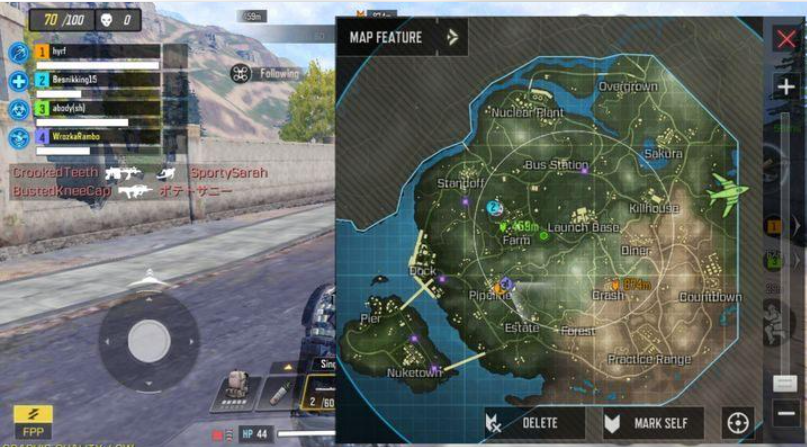
Battle royale takes a broader approach. Players enter a larger battlefield, collect equipment, and attempt to survive while dealing with other players and changing conditions.
The game also includes weapon customization and progression features, giving players reasons to continue unlocking equipment and adjusting their preferred setups.
This combination makes Call of Duty: Mobile appealing to players who want variety without switching between several different shooter games.
Multiplayer vs. Battle Royale: Which Mode Is Better?
The most useful way to understand Call of Duty: Mobile is to look at how its major gameplay styles differ.
Traditional Multiplayer: Shorter, More Focused Battles
Traditional multiplayer modes place players into more structured combat situations. Depending on the selected mode, the objective may be to eliminate opponents, capture locations, or complete a team-based task.
Team Deathmatch focuses on defeating the opposing team. Domination requires players to capture and defend designated objectives. Search & Destroy places greater emphasis on coordinated movement and careful decisions because the rules make each life more consequential.
These differences matter because the same strategy does not work equally well in every mode.
In Team Deathmatch, players need to balance aggression with awareness of where opponents may appear. In Domination, rushing toward an objective without considering nearby threats can make it difficult for a team to hold its position.
Search & Destroy rewards patience and communication. Moving too quickly into an exposed area may put the entire team at a disadvantage.
For players who enjoy learning maps, improving their aim, and working toward clear objectives, traditional multiplayer is a natural starting point.
It can also suit shorter gaming sessions because players do not need to commit to the same kind of extended survival experience associated with battle royale.
Battle Royale: Survival and Positioning
Battle royale offers a different pace.
Instead of repeatedly fighting around a small set of objectives, players enter a larger map and must gather equipment, choose routes, manage risk, and survive against other competitors.
The challenge extends beyond aiming. A player may have strong weapons but still lose because they move through an exposed area, arrive late in a dangerous location, or engage an opponent without considering nearby threats.
Positioning and awareness become particularly important as the match progresses.
This mode is a better fit for players who enjoy exploring a battlefield, preparing for encounters, and making decisions with incomplete information.
The trade-off is that individual matches may require a longer commitment than compact multiplayer battles. An early mistake can also end a promising match before a player has had much opportunity to recover.
Which Mode Should Beginners Choose?
If you are new to Call of Duty: Mobile, traditional multiplayer can be a useful place to learn the controls and become familiar with weapons.
Objective-based matches also help players understand the importance of teamwork and map awareness.
Once movement and aiming feel more comfortable, battle royale offers another way to apply those skills in a larger environment.
There is no need to master every mode immediately. Starting with the format you enjoy most can make the learning process more manageable.
Weapons and Loadouts: Finding a Setup That Works
Weapon customization is an important part of Call of Duty: Mobile’s progression system.
Players can unlock and adjust equipment, experiment with attachments, and develop loadouts that suit different combat situations.
The variety can be appealing, but having more options does not automatically lead to better results.
A setup that works well for one player may feel uncomfortable to another. Preferred engagement distance, aiming habits, movement style, and the selected game mode can all influence which equipment feels most useful.
For example, a player who frequently fights at close range may prioritize a different weapon setup from someone who prefers to engage opponents across longer distances.
The important point is to find a configuration that supports your own approach to the game.
A Practical Approach for New Players
Newcomers may be tempted to change several settings and attachments at once. This can make it difficult to identify which adjustments actually help.
A more useful approach is to make small changes.
Start with a weapon you can control comfortably. Learn how it behaves during sustained firing, then adjust your settings or attachments gradually.
Pay attention to whether the changes improve your ability to track opponents, control recoil, and respond to different situations.
It is also worth remembering that equipment cannot replace good positioning or awareness. A familiar setup used effectively may be more useful than a new configuration that does not suit your play style.
Mobile Controls: How Easy Is It to Play?
A competitive first-person shooter places greater demands on touchscreen controls than a turn-based RPG.
Players must move, aim, fire, reload, switch equipment, and respond to opponents while keeping track of the surrounding environment.
For newcomers, managing these actions at the same time can feel uncomfortable.
Touchscreen Layout and Sensitivity
The default control layout provides a starting point, but players may want to adjust the button positions and sensitivity settings to suit their preferences.
Screen size matters, too. A layout that feels comfortable on a larger phone may be awkward on a smaller display.
Rather than copying another player’s settings without understanding them, start with a simple layout and change one element at a time.
This makes it easier to determine whether an adjustment actually improves comfort and control.
Performance and Responsiveness
The quality of the mobile experience depends partly on the device being used.
Hardware capability, available memory, graphics settings, software compatibility, and background applications can all affect performance.
For a competitive shooter, stable and responsive gameplay is often more useful than choosing the highest graphics settings available.
If performance is inconsistent, check that your device meets the current requirements and consider lowering graphics settings.
Network stability is also important. Call of Duty: Mobile requires an internet connection, and connection problems can make combat feel less responsive.
Players experiencing lag should check their connection before assuming that every missed shot is a problem with their aim.
Progression, Updates, and In-Game Purchases
Call of Duty: Mobile is free to download and includes optional in-game purchases.
The game also uses progression systems that let players earn experience and unlock or obtain various equipment options through play. Available content and acquisition methods may change with updates.
For players who enjoy customization, unlockable items and cosmetic options can provide additional goals.
However, not every available item needs to be collected. Players can focus on the modes they enjoy and develop a preferred set of weapons rather than treating every new release as essential.
Before making a purchase, check exactly what the offer includes, whether it is limited-time, and whether the cost fits your budget.
Seasonal content can create excitement, but it can also make the game feel like an ongoing list of items to collect. Players who prefer a simpler experience may find it more enjoyable to concentrate on gameplay rather than trying to keep up with every offer.
The most important question is whether the game’s progression system adds enjoyment or creates pressure to spend.
Call of Duty: Mobile Pros and Cons
Pros
- Multiple multiplayer modes: Different objectives create variety beyond simply eliminating opponents.
- Battle royale option: Players can switch to a larger survival experience when they want a different pace.
- Weapon customization: Loadouts allow players to experiment with different setups.
- Team-based gameplay: Coordinated movement and communication can make matches more engaging.
- Recognizable franchise elements: Familiar maps, weapons, and characters connect the game to the wider Call of Duty series.
- Free-to-play access: Players can download the game and explore its core modes without an upfront purchase.
Cons
- Touch controls require practice: Aiming and movement can take time to master.
- Competitive matches can be intense: Players who prefer relaxed gameplay may find the pressure frustrating.
- Performance varies by device: Not every phone provides the same level of responsiveness.
- Ongoing updates require attention: Additional content and downloads can affect storage needs.
- Progression can feel demanding: Players who want to unlock every item may find the amount of available content overwhelming.
- Network dependence: Connection problems can affect the online experience.
Call of Duty: Mobile vs. PUBG Mobile
Call of Duty: Mobile and PUBG Mobile both offer mobile shooting experiences, but their main attractions are different.
Call of Duty: Mobile is a better fit for players who want several types of combat in one game. Traditional multiplayer provides structured objectives and focused battles, while battle royale offers a larger survival experience.
PUBG Mobile places its central emphasis on battle royale gameplay, where landing decisions, equipment collection, movement, and survival play major roles.
The difference is not simply that one game is faster than the other. Call of Duty: Mobile offers more ways to change the type of match you play, while PUBG Mobile is particularly appealing to people who enjoy the tension of a battle royale match.
Choose Call of Duty: Mobile if you want objective-based multiplayer alongside battle royale. Consider PUBG Mobile if the survival format itself is the main reason you want to play.
Neither game is automatically better for everyone. Your preferred match length, control comfort, and interest in team objectives