Creating digital artwork no longer requires an expensive computer or a professional studio setup. With the right drawing application, artists can sketch characters, experiment with different brushes, design manga panels, and develop illustrations using a phone, tablet, or computer.
ibisPaint is a digital drawing application developed by the Japanese company ibis inc. It offers a range of illustration tools, including customizable brushes, layers, manga-related features, filters, and animation functions.
But is ibisPaint suitable for beginners, hobby artists, and more experienced illustrators? And how does it compare with traditional photo editing software?
In this review, we examine ibisPaint’s main features, practical uses, advantages, limitations, and the types of users who may find it useful.
1. What Is ibisPaint?
ibisPaint is a digital drawing and illustration application available on supported mobile and desktop platforms.
Unlike software primarily designed to correct photographs, ibisPaint focuses on creating artwork from scratch or developing existing images into illustrations.
Its tools support a range of creative activities, including sketching, character design, manga drawing, coloring, and other digital art projects.
The application is particularly relevant to people who enjoy anime-inspired artwork, Japanese manga, character illustration, and digital sketching.
Another part of its appeal is its connection to an artist community. Users can share artwork and, where supported, explore drawing-process videos that demonstrate how an illustration was created.
ibisPaint offers different versions and membership options, so the available tools and benefits may vary depending on the platform and plan.
2. Key Features of ibisPaint
A Wide Range of Drawing Brushes
Brushes play an important role in digital illustration because they influence the appearance, texture, and overall style of an artwork.
ibisPaint provides a variety of brush types for different creative purposes. Depending on the selected brush, artists can create pencil-like sketches, clean line art, soft shading, watercolor-style effects, and other visual treatments.
Brush settings allow users to adjust characteristics such as size and opacity. Additional brush options can help artists develop a style that suits their work.
For example, someone drawing an anime character might use a fine pen brush for outlines, a broader brush for coloring, and a softer brush for shadows.
The ability to work with different brush styles within one application makes ibisPaint useful for artists who want to experiment without switching between several drawing programs.
Who benefits most?
Beginners can experiment with different tools while learning basic drawing techniques. More experienced artists may appreciate the flexibility when developing character illustrations, stylized portraits, or manga artwork.
The number of available brushes and certain brush-related benefits may depend on the version or membership plan.
Layer-Based Drawing and Editing
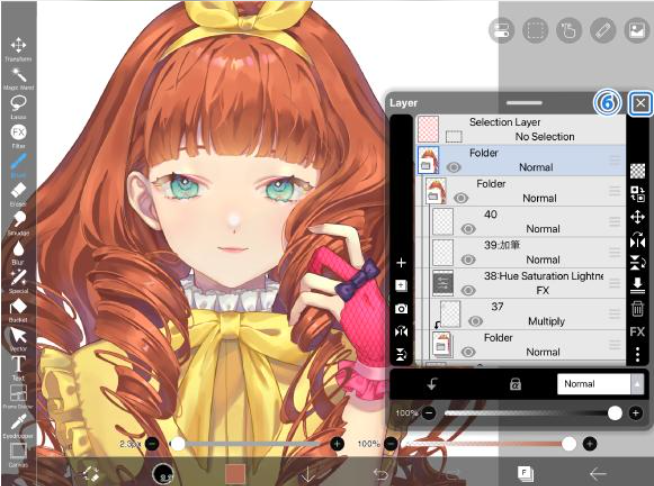
Layers are an essential part of many digital illustration workflows.
Instead of placing every element on a single canvas, artists can separate parts of their work into different layers. For example, a character’s sketch, line art, background, colors, and shading can be organized independently.
This makes revisions easier. If the background needs to change, the artist can work on that layer without having to redraw the character.
Layer-based editing can also help users experiment with different colors, visual effects, and composition ideas while keeping the original artwork more manageable.
For beginners, learning how to organize layers can take some practice. However, it is a useful skill for anyone who plans to create more detailed digital illustrations.
Manga and Comic Creation Tools
ibisPaint is particularly relevant to artists interested in manga and comic-style artwork.
Its manga-related features include tools for working with screen tones, comic panels, and text elements. These functions can help users develop a page layout and give an illustration a more traditional manga appearance.
A creator might begin with character sketches, develop the line art, add screen tones, and arrange panels for a short comic.
Having drawing and manga-related tools in the same application can make this workflow more convenient than combining several unrelated programs.
However, users producing long comics or professional publications should evaluate whether the available page-management and export options meet their specific production requirements.
Filters and Image Adjustment Tools
Although ibisPaint is primarily a drawing application, it also includes image-related functions.
Filters and visual adjustments can help artists change the appearance of existing images, add effects, or refine the look of an illustration.
Users can also import images as references for drawing. For example, a photograph may be used to study a pose, understand lighting, or develop a stylized character illustration.
This creates a useful connection between image editing and digital art.
However, ibisPaint should not be confused with a dedicated photography application. Users who primarily need advanced portrait retouching, extensive photo organization, or specialized photographic adjustments may prefer software designed specifically for those tasks.
Animation and Frame-Based Workflows
ibisPaint also provides animation-related functionality, allowing users to explore frame-based animation workflows.
Frame-based tools can help artists experiment with simple movement, such as a blinking character, a moving object, or a short animated sequence.
Onion-skin functionality can be useful when working with consecutive frames because it helps artists compare drawings and maintain continuity between movements.
For someone who already creates illustrations, experimenting with animation can provide another way to use existing drawing skills.
However, users should distinguish basic animation features from a complete professional animation production environment. People planning more complex projects should check the available tools, export options, and platform-specific limitations.
Cross-Device Availability
ibisPaint is available across several device categories, including iOS, Android, Windows, and macOS.
This makes it an option for users who prefer drawing on mobile devices as well as those who work on a desktop computer.
The experience can differ depending on the device. A phone may be convenient for quick sketches, while a tablet with a stylus can offer more drawing space. A desktop setup may be preferable for artists who like working with a larger display.
Some cross-device workflows may also depend on cloud services, account settings, or membership benefits.
Before choosing a version, check the current system requirements and confirm that the features you need are available on your preferred device.
3. Advantages of ibisPaint
ibisPaint offers several benefits for people interested in digital drawing.
A drawing-focused feature set. The application is designed around illustration rather than treating drawing as a secondary function.
Flexible brush options. Different brush styles and settings allow artists to explore sketching, line art, coloring, and shading.
Layer-based editing. Separating artwork into layers makes revisions and experimentation easier to manage.
Useful manga tools. Screen tones, panel-related features, and text tools can help creators develop comic-style artwork.
Additional creative functions. Filters and animation-related tools provide more options than a basic sketching application.
Multiple supported platforms. Users can choose from supported mobile and desktop versions according to their devices and workflow.
An artist community. Artwork sharing and drawing-process content can provide inspiration and opportunities to learn from other creators.
Taken together, these features make ibisPaint a useful option for people who want a drawing-oriented application with more than basic sketching tools.
4. Potential Limitations of ibisPaint
Despite its broad creative feature set, ibisPaint is not the best choice for every image-related task.
The Interface May Take Time to Learn
Drawing applications often contain many brushes, layer controls, selection tools, and adjustment options.
For a beginner, the number of available controls may initially feel overwhelming.
New users may find it easier to begin with a small set of essential tools: a basic brush, an eraser, a few layers, and simple color controls.
As their skills develop, they can gradually explore more advanced functions.
Some Features May Require Payment
ibisPaint offers free and paid options, and certain features or membership benefits may depend on the selected plan.
Before subscribing, check the current pricing, usage restrictions, and included features for your device.
The most expensive option is not necessarily the best choice for someone who only needs basic sketching and coloring tools.
It Is Not Primarily a Photo Retouching Application
ibisPaint can work with imported images and provides filters and other image-related functions. However, its main purpose is digital drawing and illustration.
Photographers who need extensive portrait correction, professional photographic color workflows, or large-scale image catalog management may find a dedicated photo editor more appropriate.
The right choice depends on whether the main task is creating artwork or modifying existing photographs.
The Experience Can Vary by Device
Drawing on a phone, tablet, and desktop computer involves different workflows.
Screen size, input methods, hardware performance, and platform-specific features can affect the overall experience.
Users who rely on a stylus, particular export formats, or cross-device project transfer should check compatibility before building their workflow around the application.
5. Who Should Consider ibisPaint?
ibisPaint may be a suitable option for several groups of users.
Beginners learning digital art
People who are learning sketching, coloring, or digital illustration can explore different tools while gradually developing their skills.
Anime and manga artists
The drawing brushes, layers, and manga-related features make the application relevant to people who create Japanese-inspired illustrations and comic pages.
Hobby artists
Users who enjoy drawing characters, animals, portraits, or imaginative scenes can use the application for personal projects and creative experiments.
Students and younger creators
A drawing application available on supported mobile devices can make digital art more accessible to people who do not have a full desktop setup.
Social media illustrators
Artists who create character artwork, fan art, or visual content for online communities may appreciate having drawing and coloring tools in one application.
Artists who work across devices
Users who draw on different supported platforms may find the available device options useful, although specific transfer and synchronization capabilities should be checked in advance.
ibisPaint may be less suitable as a primary tool for users whose work centers on professional photo retouching, advanced desktop publishing, or specialized animation production.
6. ibisPaint vs. Traditional Photo Editing Software
One of the most important things to understand about ibisPaint is its intended purpose.
A traditional photo editor is generally designed to modify existing photographs. Typical tasks include adjusting exposure, correcting colors, removing unwanted objects, and preparing images for publication.
A digital drawing application focuses more on creating and developing artwork. Its tools are designed to help artists sketch, build illustrations, apply colors, and organize visual elements.
The following table highlights these general differences.
| Comparison point | ibisPaint | Traditional photo editor |
|---|---|---|
| Primary purpose | Digital drawing and illustration | Editing and improving existing photographs |
| Brush-based drawing | A core part of the workflow | Depends on the application |
| Manga and comic tools | Includes relevant illustration features | Usually not the main focus |
| Layers | Supports layer-based artwork | Often supports layers, depending on the application |
| Photo adjustments | Available for certain image-editing tasks | Often a central part of the workflow |
| Best suited for | Illustrators, manga artists, and hobby creators | Photographers, image editors, and people preparing photographs |
This is a general comparison, not a claim that all photo editors have the same features.
Some professional graphics applications support both illustration and photo editing. However, if your main goal is to create original drawings, an application designed around illustration may be more appropriate than a tool focused primarily on photography.
7. Practical Tips for Getting Started With ibisPaint
If you are new to digital drawing, you do not need to learn every feature immediately.
A simple workflow can help you become familiar with the application.
Step 1: Start with a small sketch.
Create a simple drawing rather than beginning with a complex character or comic page. This lets you focus on the basic controls.
Step 2: Experiment with a few brushes.
Try a pencil-style brush, a pen brush, and a soft brush. Notice how their lines and textures differ.
Step 3: Separate important elements into layers.
For example, keep the sketch, line art, and coloring on separate layers. This makes later changes easier to manage.
Step 4: Practice basic coloring and shading.
Choose a limited color palette and experiment with light and shadow before adding complicated effects.
Step 5: Explore additional features gradually.
Once you are comfortable with the basics, try manga tools, filters, or animation-related functions if they match your interests.
This approach makes it easier to learn the application without being distracted by every available tool.
8. Frequently Asked Questions
Is ibisPaint free to use?
ibisPaint offers free and paid options. Available features and membership benefits can vary by platform and plan. Check the current official product information before subscribing.
Is ibisPaint suitable for beginners?
It can be suitable for beginners interested in digital drawing. However, the interface contains many tools, so starting with basic brushes, layers, and coloring techniques may make the learning process easier.
Can ibisPaint be used for manga drawing?
Yes. ibisPaint includes manga-related tools, such as screen tones and comic-oriented functions. These can help users create manga-style illustrations and comic artwork.
Is ibisPaint available on PC?
ibisPaint has desktop versions for supported Windows and macOS systems, as well as mobile versions. Check the official website for current compatibility and system requirements.
Can ibisPaint edit photographs?
It supports certain image-editing tasks, including filters and adjustments. However, its primary focus is digital drawing and illustration rather than comprehensive professional photo retouching.
Does ibisPaint support layers?
Yes. Layer-based editing is an important part of its illustration workflow. Layers allow users to separate different elements of their artwork and make revisions without having to modify the entire composition at once.
Can ibisPaint create animations?
The application includes animation-related functionality for frame-based creative work. The available tools and capabilities should be checked for the version and platform you intend to use.
Is ibisPaint suitable for professional artists?
It may suit artists whose workflows align with its drawing and illustration tools. Whether it is appropriate for professional production depends on the complexity of the project, required export formats, device setup, and other workflow requirements.
9. Final Verdict: Is ibisPaint Worth Trying?
ibisPaint is worth considering if your main interest is digital drawing, character illustration, or manga creation.
Its brush options, layer-based workflow, manga-related features, and availability across supported mobile and desktop platforms make it a versatile option for aspiring artists and hobby creators.
Its biggest strength is its focus on illustration. Rather than concentrating primarily on photographic correction, it provides tools intended to help users create and develop original artwork.
There are some limitations to consider. Beginners may need time to become familiar with the interface, certain benefits may require payment, and users with specialized photo-editing or animation requirements may need additional software.
Overall, ibisPaint is a practical option for people who want to explore digital art, particularly drawing and manga-style illustration. The best way to evaluate it is to compare its current features with your creative needs and preferred device.
Official Website: https://ibispaint.com/
Review Methodology: This article summarizes publicly available product information and describes common use cases for digital drawing software. It does not claim hands-on testing or independent performance benchmarking. Features, membership benefits, and compatibility may change as the application is updated.