1. What WinZip Does
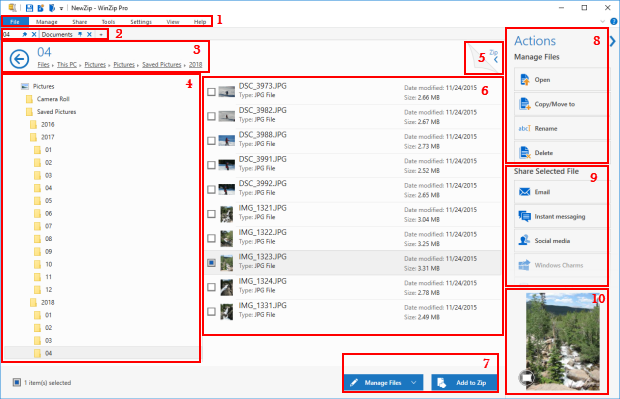
WinZip is the original commercial file-compression utility (born 1991, now owned by Corel) for Windows and macOS. At its core it zips and unzips files with strong AES encryption, but the modern product has grown into a “suite”: multi-cloud file management (connecting OneDrive, Google Drive, Dropbox), encrypted email attachments via WinZip Courier, automated backups, secure file wiping, PDF tools, image management, system-utility add-ons, and an Enterprise tier with FIPS 140-2 compliant encryption, centralized IT policy enforcement, and SharePoint/Teams/Slack integration. It’s sold entirely as annual subscriptions now — the one-time-license era is over.
2. Pros
- The industry standard — .zip itself; guaranteed compatibility with every system, email client, and archiver on earth.
- Real security depth — AES-256 encryption, encrypted sharing, FIPS 140-2 in Enterprise, IT-controlled recovery keys.
- Suite breadth — backups, cloud connectors, file wiping, PDF/image tools, and PC utilities in one subscription.
- Enterprise muscle — centralized policy management, MSI deployment, Windows Information Protection support; trusted by 100,000+ businesses.
- Cheap entry — Standard starts around $2.92/month billed annually, less than a coffee.
- 21-day full-feature free trial with no credit card upfront.
3. Cons
- Aggressive monetization — constant upsell ads and promotional pop-ups, reported even for paying customers; the trial experience is pushy by design.
- Subscription-only now — no more one-time licenses; legacy buyers must migrate to annual billing, and pricing on winzip.com is dynamically rendered by region/promotion, making true costs hard to pin down.
- Support criticism — users consistently report non-responsive customer service.
- Free alternatives cover the basics — Windows/macOS have built-in zipping; 7-Zip (free, open source) handles most consumer compression tasks.
- Trust erosion — review outlets have flagged deceptive trial and marketing tactics, and the “mandatory trial” structure confuses buyers about what they’re paying for.
- Mac pricing is separate — multi-user Mac licensing starts around $6/Mac/yr, easy to overbuy.
4. Pricing Comparison: Free vs Paid
|
Plan |
Billing |
Key Features |
|---|---|---|
|
Free Trial |
21 days, no card |
Full feature set; ends with mandatory purchase prompts |
|
Standard |
~2.92/mo billed annually (~35/yr) |
Core compression + AES encryption, cloud management, WinZip Courier email encryption |
|
Pro |
~4.58/mo billed annually (~55/yr) |
+ automated backups, secure FTP, zip malware scanning, ZipShare (5GB sends), PDF & image tools |
|
Ultimate |
~8.33/mo billed annually (~100/yr) |
+ System Utilities (cleanup, driver updates) and PDF Fusion editor |
|
Enterprise |
Custom quote |
FIPS 140-2 encryption, centralized admin, SharePoint/Teams/Slack integration |
|
Mac (multi-user) |
From ~$6/Mac/yr |
Volume licensing, 2–999 users |
Note: WinZip discounts deeply at seasonal sales (up to ~80% off around Black Friday), so real-world prices vary widely — always check the live pricing page.
🖼️ Suggested chart image: Tier ladder graphic — Standard → Pro → Ultimate with the key feature unlock at each step.
5. Who Is WinZip For?
- Enterprise IT departments — policy enforcement, FIPS compliance, and deployment tooling are the real product here.
- Regulated industries — legal, healthcare, finance where encrypted zip workflows are already standardized.
- Non-technical office users — who want one trusted tool for compress, encrypt, and email.
- Not ideal for: casual users (Windows/macOS built-in zipping is free and sufficient), budget buyers (7-Zip is free and open source), or anyone allergic to upsell pop-ups.
6. Conclusion
WinZip in 2026 is two products in one wrapper: a genuinely capable enterprise security-and-compression suite, and a consumer app that monetizes aggressively. If you manage IT for an organization that must enforce encrypted file sharing, WinZip Enterprise remains a defensible, even smart, purchase. If you just need to shrink files, the honest answer in 2026 is that your operating system already does it — and 7-Zip does the rest for free. Buy WinZip for the compliance features and centralized control; don’t buy it for compression alone.