1. What Movavi Does
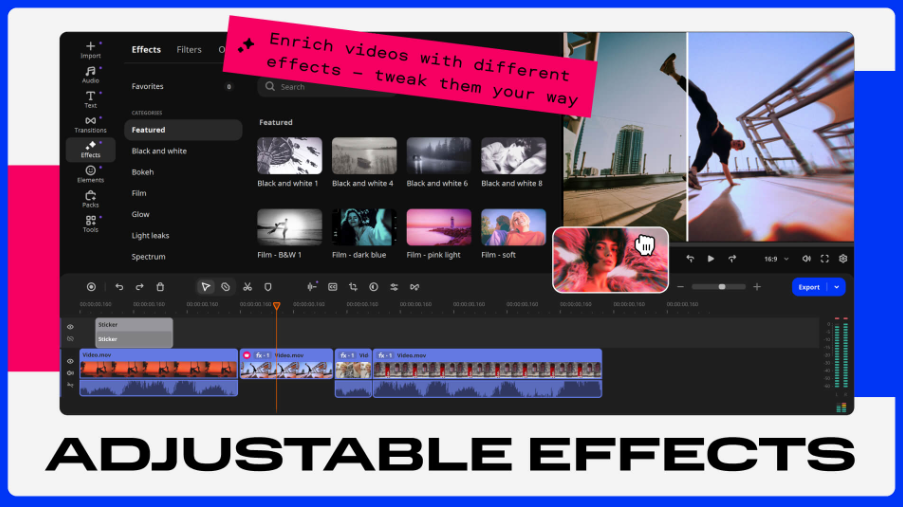
Movavi Video Editor 2026 is a consumer-friendly video editor for Windows and macOS built around one promise: pro-looking results without a pro learning curve. You get a drag-and-drop multi-track timeline, a revamped 2026 interface, and a genuine AI suite — silence removal (auto-cut dead air), auto subtitles in 13 languages, AI background removal, motion tracking, noise reduction, auto-crop to vertical formats, and upscaling. It also bundles a screen recorder and a media converter (180+ formats) in the Suite tier, plus an Effects Store with 10,000+ effects and 1,500 music tracks, and one-click export to YouTube/TikTok.
2. Pros (优点)
- Genuinely easy — most users produce a finished video on day one; the 2026 timeline redesign and hover previews remove friction.
- Strong AI toolkit — silence removal and auto-tracked vertical cropping save real hours; auto subtitles export SRT.
- Lifetime license available — a ~69.95 one-time option (frequently discounted to ~35–40 via resellers) is rare among editors; pays for itself in ~3 months vs Adobe.
- All-in-one bundling — screen recorder + converter in Video Suite Plus (~$99.95/yr) replace two separate app purchases.
- Lightweight — launches fast, runs well on modest hardware; no subscription needed for the core editor.
- Cheap upgrades — moving from an older version costs just ~$15.95.
3. Cons
- Free trial is heavily restricted — exports carry a watermark and clips are capped around 60 seconds; there’s no real free version.
- Trial auto-renewal trap — the 7-day trial auto-renews (~$49.95/mo) if you don’t cancel; this is the single most common complaint in negative reviews.
- “Lifetime” has fine print — the perpetual license covers the version you bought; major upgrades (2026 → 2027) cost extra.
- No HEVC/H.265 support — iPhone-shot footage needs pre-conversion, a serious annoyance in 2026.
- 4K instability — 1080p is solid; heavy 4K projects stutter and render slowly.
- No multi-cam, no pro color/audio tools — advanced users outgrow it; Filmora ships more AI tools (25+), DaVinci Resolve is free and deeper.
4. Pricing Comparison: Free vs Paid
|
Plan |
Type |
Price |
Notes |
|---|---|---|---|
|
Free Trial |
7 days |
$0 |
Watermarked exports, ~60s clips, 7-day Effects Store access; auto-renews if not cancelled |
|
Video Editor |
Monthly subscription |
~$17.95/mo |
Core editor + AI tools; no recorder/converter |
|
Video Editor Plus |
Lifetime (one-time) |
|
Full editor, 3 bonus effect packs; no future major-version upgrades |
|
Video Suite Plus |
Annual |
|
Editor + Screen Recorder + Converter + full Effects Store; always latest version |
|
Version upgrade |
One-time |
~$15.95 |
From any older version to 2026 |
🖼️ Suggested chart image: Cost-over-3-years bar chart — Movavi lifetime (~$70 + 16 upgrade) vs Movavi Suite (300) vs Adobe Premiere (~830) vs DaVinci Resolve (0).
5. Who Is Movavi For?
- Beginner and hobbyist creators — YouTubers, vloggers, and social-media editors who want results this week, not after a course.
- Course creators and marketers — built-in screen recorder + silence removal is ideal for tutorial-style videos.
- Subscription-fatigued buyers — the lifetime license is the strongest argument in the whole category.
- 1080p-first workflows — corporate comms, family videos, real estate tours.
- Not ideal for: iPhone shooters (no HEVC), 4K-heavy editors, multi-cam productions, or anyone needing pro color grading — go DaVinci Resolve (free) or Premiere instead.
6. Conclusion
Movavi Video Editor 2026 occupies a rare sweet spot: easier than DaVinci, cheaper than Adobe, and available as a genuine lifetime purchase. The AI tools that matter (silence removal, auto-subtitles, vertical reframing) actually work, and the 2026 timeline polish shows a team listening to its users. Go in with eyes open about three things: the trial auto-renews, “lifetime” means “this version,” and iPhone HEVC footage needs pre-converting. If those are acceptable, the ~$69.95 lifetime license is the best value in beginner video editing in 2026 — set a reminder if you start with the trial.