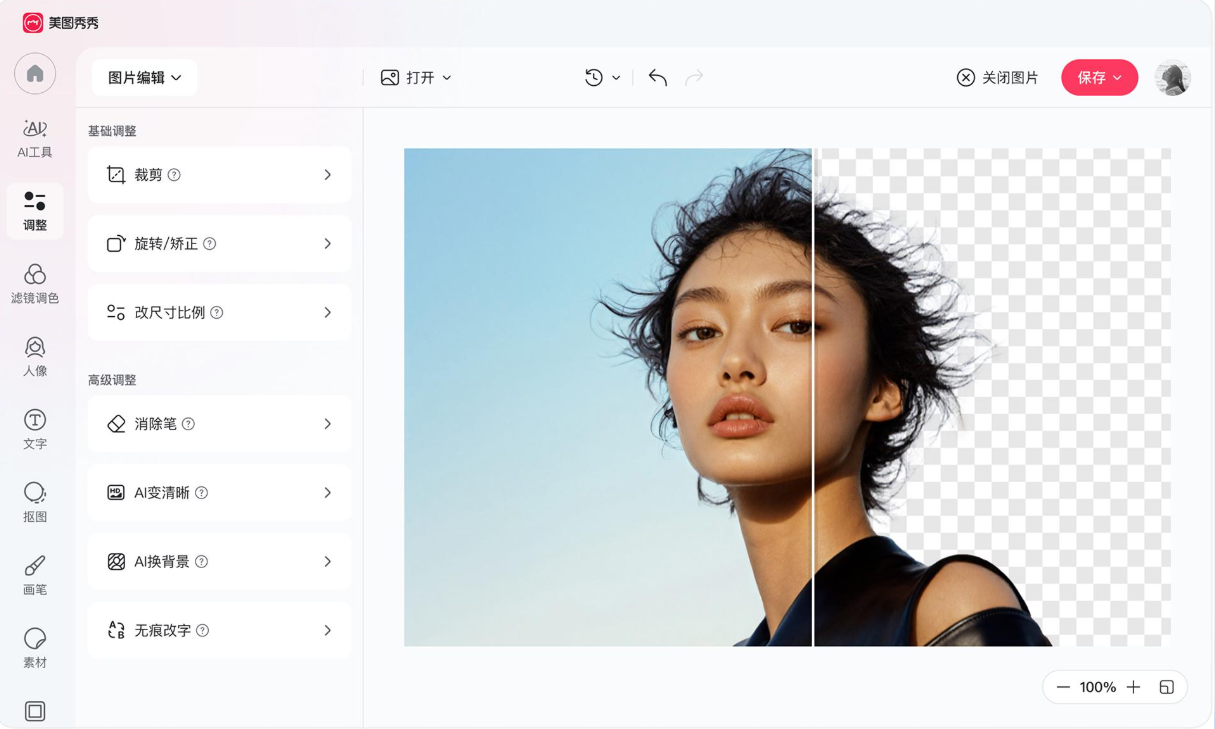
Photo editing has become more accessible with the development of artificial intelligence. Tasks that once required detailed manual adjustments, such as removing unwanted objects, improving image clarity, or separating subjects from backgrounds, can now be handled with AI-assisted tools.
Meitu is one of the image editing platforms exploring this approach. Developed by Chinese technology company Meitu, its products combine traditional photo enhancement tools with AI-powered editing features.
The desktop version of Meitu offers functions such as AI object removal, background cutout, image enhancement, image expansion, portrait retouching, and batch processing. These tools are designed to simplify common image editing tasks for everyday users and content creators.
But how useful are these features in practice, and who should consider using Meitu?
In this review, we examine its main editing capabilities, practical applications, advantages, limitations, privacy considerations, and potential alternatives.
1. What Is Meitu Photo Editor?
Meitu is an image editing platform known for portrait enhancement, beauty filters, and AI-assisted photo processing.
The company originally gained attention through mobile photo beautification products. Its software offerings have since expanded to include more extensive image editing functions for different types of users.
The Meitu desktop editor focuses on practical image processing. Its advertised features include removing unwanted objects, changing backgrounds, improving image clarity, editing portraits, resizing images, and processing multiple files.
This makes it relevant to several types of users:
- People who regularly edit portrait photographs.
- Bloggers preparing images for websites.
- Social media content creators.
- Small businesses creating product photographs.
- Users who want to simplify repetitive image editing tasks.
One important distinction is that Meitu offers different products and versions. The desktop editor and mobile applications do not necessarily provide identical tools or subscription benefits.
This review focuses primarily on the desktop editing experience described on Meitu’s official PC product website. Specific features, pricing, and availability should be checked for the version and region you intend to use.
2. Main Features of Meitu Photo Editor
AI Photo Enhancement
One of Meitu’s main attractions is its AI-assisted image enhancement functionality.
The desktop product information describes AI enhancement tools designed to improve the appearance and clarity of different image types, including portraits, product photographs, and text-based images.
This can be useful when an original picture appears too soft, has limited detail, or needs visual improvement before publication.
For example, a blogger might have an older photograph that looks less clear than the other images in an article. An AI enhancement tool may help improve its perceived sharpness and make it more consistent with the surrounding content.
However, AI enhancement does not guarantee perfect recovery of missing details.
The result depends on the original image, its resolution, the type of content, and the processing method. Users should inspect the final image carefully, especially when accuracy matters.
AI Object Removal
Removing unwanted objects is another useful part of Meitu’s editing toolkit.
The AI removal feature is designed to identify unwanted elements and fill the affected area with reconstructed background content.
Possible editing tasks include:
- Removing distracting objects from photographs.
- Cleaning up unwanted visual elements.
- Removing selected text or marks from images.
- Improving the appearance of product photographs.
- Correcting minor background distractions.
Consider a photograph taken in a busy public place. There may be unwanted objects in the background that draw attention away from the main subject.
An AI removal tool can help simplify the editing process without requiring every part of the background to be reconstructed manually.
Nevertheless, results may vary.
Removing a small object from a plain wall is generally a simpler task than removing a large object that overlaps complicated textures, patterns, or other people.
Users should also avoid removing watermarks or ownership information from images they do not own or have permission to modify.
AI Background Removal and Replacement
Background removal is particularly useful for product images, profile photographs, and promotional graphics.
Meitu’s desktop product advertises AI cutout functionality designed to separate subjects from their original backgrounds.
Once a subject has been separated, users can work with a different background or prepare an image with a transparent background, depending on the available tools.
For example, an online seller may want to place a product photograph against a clean background. A content creator may want to prepare a portrait for a promotional graphic.
Automated cutout tools can make these tasks more convenient.
However, the quality of the result depends on the original photograph.
Fine hair, transparent materials, overlapping objects, and subjects with colors similar to the background can make accurate separation more difficult.
For commercial images, it is important to inspect edges and details before publishing the final result.
AI Image Expansion
Another interesting feature is AI image expansion.
Traditional cropping removes parts of an image to fit a particular layout. Image expansion takes a different approach by extending the canvas and generating additional visual content around the original picture.
This can be useful when an image needs to fit a different aspect ratio or when the original composition does not provide enough space around the subject.
For example, a portrait photograph may have limited space above the subject’s head. Expanding the image could help create additional room for a title or other graphic elements.
Meitu’s desktop product information describes AI expansion and automatic background filling as part of its editing toolkit.
The generated areas should always be reviewed carefully. AI-generated extensions may introduce visual inconsistencies, particularly when the original image contains detailed backgrounds, text, or recognizable objects.
Portrait Retouching and Beauty Enhancement
Meitu has a long association with portrait beautification, and portrait editing remains an important part of its product identity.
Its desktop offering advertises HD facial retouching and other appearance-related enhancement functions.
These tools can be relevant to users preparing:
- Profile photographs.
- Social media portraits.
- Personal photography.
- Promotional images.
- Visual content for blogs and websites.
Portrait enhancement can help adjust the overall appearance of an image without requiring every correction to be performed manually.
However, excessive retouching can make photographs look unnatural.
For professional or business-related photography, it is generally better to preserve realistic skin texture and recognizable facial details rather than applying every available beauty effect.
Users should also consider whether the final image accurately represents the person in the photograph.
Batch Image Processing
Batch processing is one of the more practical features for users who regularly work with multiple images.
Instead of repeating the same editing operation on every photograph, supported batch tools allow users to process groups of files in a more organized workflow.
Meitu’s desktop product describes batch operations such as:
- Resizing multiple images.
- Converting image formats.
- Adding watermarks and text.
- Removing unwanted objects.
- Applying background cutout operations.
- Enhancing image clarity.
This can be useful for bloggers, online sellers, and small businesses.
For example, an online shop may need to prepare 50 product photographs before adding them to a website.
The owner might need consistent dimensions, cleaner backgrounds, and a similar visual presentation across the entire image collection.
Batch processing can reduce repetitive work, although the final images should still be checked individually.
An automated adjustment that works well on one photograph may produce a different result on another.
Additional Image Editing Tools
Beyond its main AI features, Meitu provides several additional utilities.
Depending on the product version, users may find tools for:
- Image collages.
- GIF creation.
- Image splitting.
- ID photo preparation.
- Scanning and image cleanup.
- Format conversion.
- Watermark and text operations.
These additional functions make the platform more versatile for everyday image preparation.
Users who only need occasional photo adjustments may find this combination convenient because several common tasks can be handled within one application.
3. Advantages of Meitu Photo Editor
Meitu has several strengths worth considering.
AI-assisted editing tools. Functions such as object removal, background cutout, image enhancement, and image expansion can simplify common editing operations.
Portrait enhancement capabilities. Its established focus on beauty editing makes it relevant to users who regularly prepare portrait photographs.
Useful batch-processing options. Processing multiple images can save time when resizing, converting, or applying supported editing operations.
A broad range of image utilities. Additional functions such as collage creation, GIF production, and image cleanup provide more flexibility.
Accessible editing approach. Users who are not familiar with advanced image editing may appreciate tools designed around simplified operations.
Useful for content preparation. Bloggers, small businesses, and social media creators may benefit from combining several image-processing functions in one platform.
Overall, Meitu’s main appeal is the combination of automated editing and practical image utilities.
4. Potential Limitations of Meitu
Although Meitu offers a broad range of features, there are several factors users should consider before relying on it.
AI Results Are Not Always Predictable
AI editing can reduce manual work, but automated results are not guaranteed to be accurate.
Object removal may leave unnatural background patterns. Background cutout may struggle with fine edges. Image enhancement may introduce details that were not clearly present in the original photograph.
These limitations are particularly important for product photography, commercial images, and other situations where visual accuracy matters.
Users should treat AI results as editable output rather than automatically accepting every generated result.
Advanced Manual Control May Be Limited
Meitu focuses heavily on simplified editing and AI-assisted operations.
This approach can be convenient for everyday users, but people who need extensive manual control over every image adjustment may prefer a more specialized professional editor.
For example, complex commercial retouching and detailed color workflows may require tools that provide more granular control.
Some Features May Depend on a Paid Plan
Meitu offers different products and feature arrangements, and certain AI functions or usage benefits may require payment.
The exact restrictions can vary depending on the platform, region, and current subscription conditions.
Before subscribing, check:
- Which features are included in the free version.
- Whether AI tools have usage limits.
- Whether additional credits or subscriptions are required.
- Whether batch processing is included.
- Whether the selected plan supports your intended workflow.
It is better to confirm these details before purchasing than to assume every advertised function is available without restrictions.
Desktop and Mobile Experiences Can Differ
Meitu has products for different device categories, but users should not assume that every mobile feature is also available on desktop.
The interface, supported editing functions, and subscription benefits may differ between versions.
If you plan to use Meitu mainly on a computer, evaluate the desktop version rather than relying entirely on descriptions of its mobile application.
Privacy and Cloud Processing Require Attention
Privacy is an important consideration when using AI photo editing software.
According to Meitu’s published desktop privacy policy, certain cloud-processing functions require images to be uploaded to its servers for processing.
The policy describes this for functions including AI enhancement, object removal, background cutout, image expansion, and other cloud-based editing operations.
This means users should not assume that every image-editing operation is processed entirely on their own device.
Before using these features, review the current privacy policy and consider the sensitivity of the images involved.
For example, avoid uploading confidential business photographs, sensitive personal documents, or private images unless you understand the relevant data-processing conditions and have permission to use the service.
You can review the official policy here:
https://pc.meitu.com/legal-agreement
5. Who Should Consider Meitu?
Meitu may be a useful option for several groups of users.
Social Media Content Creators
People who frequently prepare portraits, promotional images, and visual posts may appreciate its portrait enhancement and background editing tools.
Bloggers and Website Owners
Bloggers often need to resize photographs, improve image appearance, remove distractions, and prepare images for publication. Meitu’s combination of editing and batch functions may help with these tasks.
Small Online Businesses
Online sellers may find background removal, image enhancement, resizing, and batch processing useful when preparing product photographs.
However, product images should remain accurate representations of the actual items being sold.
Casual Photographers
Users who want to improve personal photographs without learning a complicated professional editing workflow may find its automated tools convenient.
Users Interested in AI Image Editing
People who want to experiment with object removal, image expansion, and automated enhancement may find Meitu worth exploring.
It may be less suitable for photographers who require highly specialized manual controls or users who need a fully offline editing workflow for sensitive images.
6. Meitu for Everyday Image Processing: A Practical Example
One way to understand Meitu’s usefulness is to consider a typical online business workflow.
Imagine a small online shop preparing a new collection of product photographs.
The owner has several tasks to complete:
First, clean up the original photographs.
Some pictures contain distracting objects or unwanted background details. AI removal tools may help simplify the images.
Second, separate the products from their backgrounds.
Background cutout functions can help prepare cleaner product images for an online store.
Third, improve image appearance.
AI enhancement may help improve the perceived clarity of photographs that appear soft or lack detail.
Fourth, prepare consistent image dimensions.
Batch resizing and format conversion can make it easier to prepare multiple images for a website.
Finally, review the finished images.
The owner should check product colors, edges, details, and proportions to ensure that automated editing has not changed important information.
This example illustrates where Meitu may be useful: reducing repetitive editing work while keeping several common operations within one platform.
However, automated processing should support quality control rather than replace it.
7. Meitu vs. Traditional Photo Editors
Meitu’s approach differs from that of traditional photo editing software.
Many conventional editors focus on manual adjustments, detailed retouching, and precise control over image elements.
Meitu places more emphasis on AI-assisted operations and simplified editing workflows.
| Comparison point | Meitu | Traditional photo editor |
|---|---|---|
| Main focus | AI-assisted photo editing and enhancement | Image correction and manual editing |
| Object removal | Offers AI-assisted removal tools | Depends on the application |
| Background processing | Offers AI cutout and background tools | Often available through selection tools |
| Portrait enhancement | A major product focus | Varies by application |
| Batch processing | Includes batch editing functions | Depends on the application |
| Manual control | Depends on the selected editing tool | Often offers detailed controls in professional products |
| Best suited for | Quick editing and AI-assisted image preparation | Users requiring specific manual editing workflows |
This is a general comparison rather than a performance benchmark.
Some professional editors also include AI features, while some simpler applications offer only basic adjustments.
The best option depends on the type of images you work with and how much control you need over the editing process.
8. What to Check Before Choosing Meitu
Before installing or subscribing to Meitu, consider the following questions.
1. Which version do you need?
Decide whether you want the desktop editor or a mobile application. Their tools and available features may differ.
2. Do you need AI editing regularly?
If you frequently remove objects, change backgrounds, or improve image clarity, AI functions may be useful. If you only crop and resize photographs occasionally, a simpler editor may be sufficient.
3. Are the required features included in your plan?
Check subscription conditions, usage limits, and any credit requirements before paying.
4. Are you comfortable with cloud-based image processing?
Review the privacy policy to understand which functions require image uploads and how the relevant information is handled.
5. Do you need detailed manual editing?
If your workflow involves professional retouching or precise color correction, compare Meitu with specialized desktop software.
These questions can help you decide whether the application fits your actual editing requirements.
9. Frequently Asked Questions
Is Meitu Photo Editor free?
Meitu offers different products and access arrangements. Some features may be available without payment, while certain advanced tools or benefits may require a subscription or other payment. Check the current product information for your platform and region.
Does Meitu have a PC version?
Yes. Meitu provides a desktop editing product through its official PC website. The available tools and system requirements should be checked before installation.
Can Meitu remove unwanted objects from photos?
Yes. Its desktop product advertises AI object removal functionality designed to remove selected unwanted objects and reconstruct the surrounding background. Results depend on the complexity of the image.
Can Meitu remove image backgrounds?
Meitu offers AI cutout functionality that can help separate subjects from their original backgrounds. This can be useful for portraits, product photographs, and promotional graphics.
Can Meitu improve blurry photographs?
Meitu advertises AI image enhancement tools designed to improve image clarity. However, results vary, and AI processing cannot guarantee perfect recovery of details that were not captured in the original image.
Does Meitu support batch image editing?
Yes. Its desktop product describes batch operations such as resizing, format conversion, watermarking, object removal, background processing, and image enhancement. The exact available functions should be confirmed in the current version.
Is Meitu suitable for professional photographers?
It may be useful for certain routine editing tasks, but photographers who need advanced manual control, specialized color management, or complex commercial retouching may prefer additional professional software.
Does Meitu upload photos to its servers?
Some cloud-based editing functions require image uploads for processing. Meitu’s published desktop privacy policy describes this for several AI-related features. Users should review the current policy before uploading sensitive images.
10. Final Verdict: Is Meitu Worth Trying?
Meitu is worth considering for users who want a convenient combination of traditional photo editing and AI-assisted image processing.
Its main strengths include object removal, background cutout, image enhancement, portrait retouching, image expansion, and batch operations.
These functions make it relevant to bloggers, social media creators, casual photographers, and small businesses that regularly prepare visual content.
However, Meitu is not necessarily the best choice for every workflow. AI-generated results may require manual correction, certain features may depend on paid plans, and some cloud-based functions involve uploading images for processing.
Overall, Meitu is a practical option for everyday AI-assisted photo editing, especially when convenience and repetitive image processing are important. Users who need advanced manual control or completely local image processing should compare it with other desktop editing applications before making a decision.
Official Website: https://pc.meitu.com/en/pc
Review Methodology: This article summarizes publicly available product information, official feature descriptions, and published privacy documentation. It is an informational review rather than a claim of hands-on testing or independent performance benchmarking. Features, pricing, subscription conditions, and compatibility may change over time.