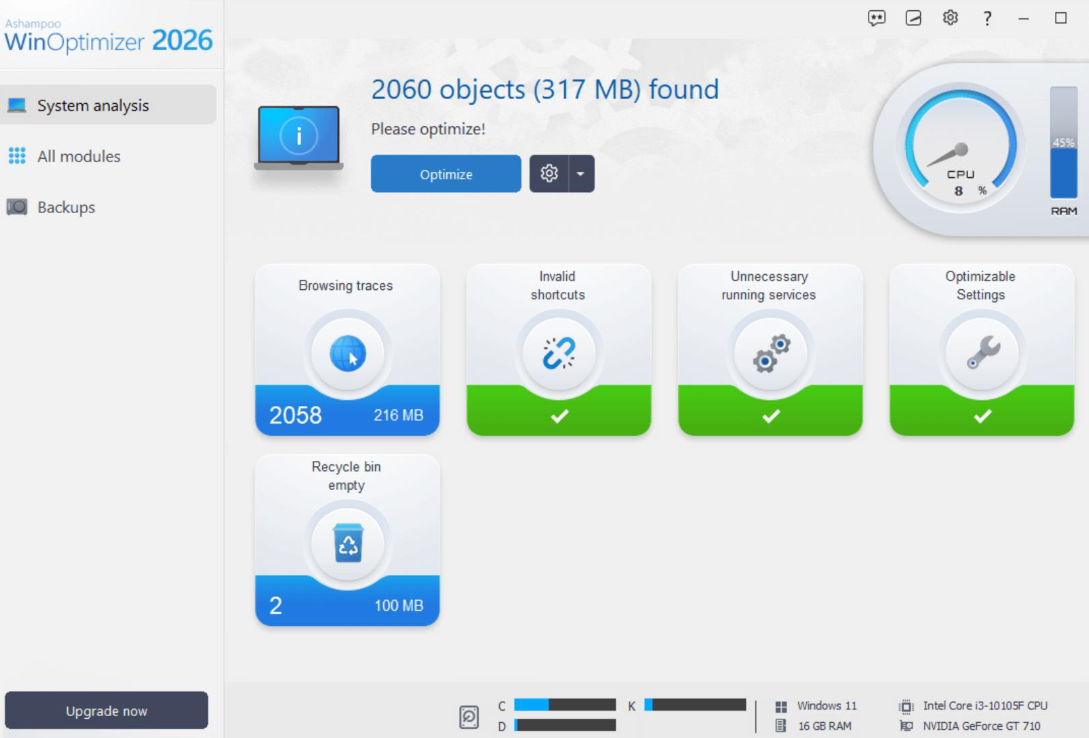
Office computers need more than occasional disk cleanup. Temporary files, browser data, unnecessary applications, and changing Windows settings can gradually make system maintenance more complicated.
Some users only need a simple utility to recover storage space. Others prefer a more comprehensive Windows maintenance application that combines cleaning, privacy controls, system analysis, and configuration tools.
Ashampoo WinOptimizer 2026 belongs to the second category.
Developed by German software company Ashampoo, WinOptimizer is a Windows maintenance application designed to help users clean unnecessary data, review system information, manage selected Windows settings, and perform other maintenance tasks.
Unlike dedicated disk cleaners, it offers a broader collection of tools. The 2026 edition includes 19 modules and is based on the technical foundation of WinOptimizer 28.
But is Ashampoo WinOptimizer worth considering in 2026? Is its broader feature set useful for office computers, or would a simpler cleanup utility be a better choice?
This review examines its main functions, practical benefits, limitations, and important considerations before using it on a business computer.
1. What Is Ashampoo WinOptimizer?
Ashampoo WinOptimizer is a Windows system maintenance and optimization application developed by Ashampoo, a software company based in Germany.
Its purpose is to provide several PC maintenance functions in one application rather than focusing exclusively on temporary-file removal.
Depending on the edition and available modules, its tools cover areas such as:
- Removing unnecessary files and selected system data.
- Cleaning supported browser traces.
- Managing privacy-related Windows settings.
- Analyzing hardware and system information.
- Reviewing installed applications and running processes.
- Customizing selected Windows settings.
- Managing certain system maintenance and file operations.
The 2026 edition is listed by Ashampoo as containing 19 modules, with updated cleaning tools, Privacy Manager improvements, and a redesigned System Information 2 interface.
This makes it a broader Windows maintenance option than a basic disk cleaner.
One important distinction: WinOptimizer is not an antivirus product, a backup replacement, or a centralized enterprise endpoint management platform. Its purpose is to help users maintain and configure individual Windows computers.
2. Main Ashampoo WinOptimizer Features
2.1 One-Click Optimization and System Cleaning
One of the main attractions of WinOptimizer is its simplified approach to system maintenance.
Its cleaning tools are designed to identify unnecessary data and selected system leftovers without requiring users to inspect every file manually.
The broader WinOptimizer product family includes One Click Optimizer, which combines several cleaning functions into a single workflow.
Depending on the edition, the cleaning process can involve areas such as:
- Unnecessary files stored on local drives.
- Temporary application data.
- Supported browser traces.
- Selected Windows and system leftovers.
- Other cleanup categories supported by the installed modules.
This can be convenient for users who prefer a central interface for routine maintenance.
However, one-click optimization should not be interpreted as permission to accept every proposed change automatically.
On office computers, some files, settings, and browser information may be needed for normal business operations. Review the selected cleaning categories before proceeding.
2.2 Drive Cleaner and Internet Cleaner
Drive Cleaner and Internet Cleaner address two common areas of Windows maintenance.
Drive Cleaner focuses on unnecessary files and storage-related cleanup.
This may be useful when employees regularly download documents, install applications, and work with files that generate temporary data.
Internet Cleaner focuses on supported browser-related data and browsing traces.
This can be relevant to users who share workstations or want to manage selected local browsing information.
However, browser cleanup has practical consequences.
Deleting cookies may sign users out of websites, remove saved preferences, or interrupt access to frequently used business platforms.
Employees should be particularly careful when using cleanup tools on computers connected to online banking, business email, customer management systems, or internal company services.
The exact browser support and cleaning rules can vary with software updates, so check the installed version’s available options.
2.3 Privacy Manager and Privacy Traces Cleaner
Privacy management is another part of WinOptimizer’s feature set.
The 2026 edition highlights Privacy Manager improvements that provide additional control over selected Windows data and privacy settings.
The broader WinOptimizer product family also includes Privacy Traces Cleaner, which is designed to identify and remove supported privacy-related traces.
These tools may appeal to users who want more control over how Windows handles certain data and system settings.
For office environments, however, privacy cleaning should not be confused with business data deletion.
Company documents, audit records, customer information, and other information subject to retention requirements should be handled according to internal policies.
A privacy tool does not automatically determine whether a particular business record is legally or operationally safe to remove.
2.4 System Information and System Analysis
WinOptimizer provides system analysis and information tools that help users examine their computers.
The 2026 edition highlights System Information 2, which includes additional information categories and an updated interface.
System information can be useful when checking:
- Hardware specifications.
- Windows configuration.
- Available storage.
- Installed components.
- Selected system details.
This may help individual users understand their computers before performing maintenance.
For small businesses, it can also provide useful information when reviewing individual workstations.
However, it should not be treated as a replacement for professional IT asset management or centralized hardware inventory systems.
2.5 Windows Customization and Tweaking
WinOptimizer includes tools for changing selected Windows settings.
Its customization functions are intended for users who want more control over the operating system than the standard Windows interface provides.
This can be useful for experienced users who understand the purpose of each setting.
For example, administrators may want to review selected Windows behaviors or adjust specific configuration options.
But changing system settings without understanding their effects can create unnecessary problems.
On employer-managed computers, Windows policies may be configured for security, compatibility, or compliance reasons.
Employees should not change company-managed settings without authorization.
2.6 File Management and Additional Utilities
WinOptimizer 2026 also includes file-related utilities beyond ordinary junk-file cleanup.
Its official feature list includes tools such as:
- File Wiper for secure file deletion.
- Undeleter for recovering certain deleted files.
- File Manipulator for selected file operations.
- File Splitter for dividing large files.
- DiskSpace Explorer for examining storage usage.
- System Benchmark for evaluating selected system performance characteristics.
These additional functions make WinOptimizer more versatile than a basic disk cleaning application.
However, file deletion and recovery tools should be used carefully.
Before permanently deleting sensitive files or changing important data, users should confirm that the files are no longer required and that appropriate backups exist.
2.7 System Maintenance and Performance Tools
WinOptimizer includes other maintenance functions designed to help users examine and manage selected Windows components.
Depending on the edition, these may include process management, service management, application removal, and other system utilities.
Such functions can be useful for experienced Windows users who want to understand what is running on their computers.
However, disabling unfamiliar services or processes is not a reliable shortcut to better performance.
Some background services are required for security software, backups, printers, business applications, and device management.
For office computers, it is better to leave essential services unchanged unless an IT administrator has reviewed the proposed modification.
3. Advantages of Ashampoo WinOptimizer
Broad maintenance toolkit: It combines cleaning, privacy, system analysis, customization, and file utilities in one application.
Multiple cleaning functions: Users can review different categories of unnecessary files and supported browsing data.
Privacy management: Privacy Manager and related cleaning functions provide additional control over selected Windows data and settings.
System information tools: The System Information 2 module helps users examine hardware and system details.
Additional file utilities: Tools such as DiskSpace Explorer and File Wiper provide functions beyond basic temporary-file removal.
Established software developer: Ashampoo maintains an official product website, documentation, download resources, and customer support.
Multiple product options: Users can compare the WinOptimizer 2026 edition with other available editions, including the Pro product line.
4. Disadvantages and Limitations
4.1 More Features Can Mean More Complexity
WinOptimizer offers a wider collection of tools than a simple disk cleaner.
This can be an advantage for experienced users, but beginners may find the number of modules unnecessary.
If your only goal is removing temporary files and recovering storage space, a dedicated cleanup utility may be easier to understand.
4.2 Licensing and Product Editions Can Be Confusing
Ashampoo lists multiple WinOptimizer products and editions.
The WinOptimizer 2026 product page and the WinOptimizer Pro 29 product page are separate listings. Their features, pricing, and licensing should not be assumed to be identical.
Before purchasing, compare the exact product name, included modules, license terms, and supported systems.
Do not assume that every feature advertised for WinOptimizer Pro is automatically included in WinOptimizer 2026.
4.3 System Configuration Changes Require Care
Optimization software can provide access to Windows settings that ordinary users rarely modify.
Changing the wrong setting may affect application compatibility, startup behavior, or normal system operations.
This is particularly important on office computers, where devices may be configured according to company security policies.
4.4 It Cannot Fix Every Performance Problem
WinOptimizer may help users remove unnecessary data and review selected system settings, but it cannot solve every cause of a slow computer.
Performance problems may be related to:
- Insufficient RAM.
- Aging or failing storage devices.
- Malware or unwanted applications.
- Hardware limitations.
- Poorly optimized business software.
- Network or server performance problems.
A system optimizer should be viewed as a maintenance tool rather than a universal performance solution.
4.5 Not a Centralized Business Management Platform
WinOptimizer is primarily intended for maintaining individual Windows systems.
Organizations managing dozens or hundreds of computers may still need dedicated endpoint management, software deployment, monitoring, backup, and security platforms.
It should not be treated as a replacement for those systems.
5. Is Ashampoo WinOptimizer Suitable for Office Computers?
Ashampoo WinOptimizer may be useful for small businesses and individual employees who want several Windows maintenance functions in one application.
Potential use cases include:
Small offices: Users who want to review system information, clean supported unnecessary files, and manage selected Windows settings.
Administrative workstations: Computers used for email, documents, spreadsheets, and web-based business applications may benefit from occasional storage maintenance.
IT support staff: Technically experienced users may find system analysis and configuration tools useful when reviewing individual computers.
Advanced Windows users: People who prefer having cleaning, privacy, file, and system utilities in one interface may appreciate its broader feature set.
However, organizations should consider several precautions before using it on company devices.
- Check company software installation policies.
- Review the proposed cleanup and optimization actions.
- Keep important documents and business records backed up.
- Avoid changing security-related Windows settings without authorization.
- Test configuration changes on a non-critical workstation first.
- Confirm that the selected license is appropriate for the intended business use.
For larger organizations, centralized management and security controls should remain the priority.
6. How to Use Ashampoo WinOptimizer Safely
If you decide to try WinOptimizer, a cautious maintenance workflow is preferable to applying every available optimization automatically.
Step 1: Visit the Official Ashampoo Website
Go to the official Ashampoo website and locate the WinOptimizer 2026 product page.
Check the product edition, current download, license information, and system requirements before installation.
Step 2: Install the Appropriate Edition
Download the version that matches your requirements.
If you are using an employer-managed computer, confirm that installing additional maintenance software is permitted.
Step 3: Review the Main Interface
Open the application and become familiar with its available modules.
Identify which tools are related to cleaning, privacy, system analysis, file management, and Windows customization.
You do not need to use every module simply because it is available.
Step 4: Start with Basic Cleaning
Review the available cleaning categories and begin with options that clearly identify unnecessary temporary data.
Check browser-related selections carefully.
Do not remove important business documents or unfamiliar application files.
Step 5: Review Privacy and Windows Settings
Before changing privacy settings or Windows configuration options, read the description of each proposed change.
Avoid modifying company-managed security settings without permission.
Step 6: Examine System Information
Use the system information tools to understand the computer’s hardware and configuration.
This can help you decide whether a performance issue is related to storage, memory, or another system component.
Step 7: Apply Only Necessary Changes
Make changes selectively.
For important system modifications, create an appropriate backup or restore point first, where supported and permitted.
After maintenance, check that essential business applications and devices continue to work normally.
7. Ashampoo WinOptimizer vs. Other PC Cleanup Applications
Ashampoo WinOptimizer is different from dedicated disk cleaners because it combines several Windows maintenance functions in one product.
| Software | Main Focus | Best Suited For |
|---|---|---|
| Ashampoo WinOptimizer | Broad Windows maintenance and optimization | Users who want several system tools in one application |
| Wise Disk Cleaner | Disk cleanup and storage maintenance | Users who mainly want to recover disk space |
| BleachBit | Open-source file and privacy cleanup | Users who prefer open-source software and technical controls |
| CCleaner | PC cleaning and additional maintenance functions | Users looking for a familiar general-purpose cleanup utility |
If your main requirement is removing unnecessary files, Wise Disk Cleaner may be sufficient.
If open-source software is important, BleachBit is worth comparing.
If you want a broader collection of Windows maintenance tools, Ashampoo WinOptimizer may be a more relevant option.
The best choice depends on your actual maintenance requirements rather than the number of features listed on a product page.
8. Frequently Asked Questions
Is Ashampoo WinOptimizer free?
Ashampoo’s WinOptimizer product pages list different editions and licensing options. Availability and pricing can change by product and region. Check the exact WinOptimizer edition on the official website before downloading or purchasing.
Does Ashampoo WinOptimizer support Windows 11?
Ashampoo’s product information lists Windows 11 support for its current WinOptimizer products. Check the system requirements for the exact edition you intend to install.
Can Ashampoo WinOptimizer remove temporary files?
Yes. Its cleaning tools are designed to identify and remove supported unnecessary files, application leftovers, and selected browsing data.
Does Ashampoo WinOptimizer include privacy tools?
Yes. The 2026 edition highlights Privacy Manager improvements, and the wider WinOptimizer product family includes privacy-related cleaning functions. The exact modules should be checked against the edition being used.
Can Ashampoo WinOptimizer improve computer performance?
It provides tools for cleaning, system analysis, and selected Windows optimization tasks. These may help with certain maintenance issues, but they cannot guarantee a noticeable speed improvement on every computer.
Is Ashampoo WinOptimizer suitable for office computers?
It may be suitable for individual Windows office computers, especially when users need more than basic disk cleanup. Businesses should review licensing, installation policies, data retention requirements, and system configuration changes before using it.
Is Ashampoo WinOptimizer better than Wise Disk Cleaner?
They serve somewhat different purposes.
Wise Disk Cleaner focuses more directly on disk cleanup and storage maintenance, while Ashampoo WinOptimizer provides a broader collection of Windows maintenance and optimization tools.
Choose according to whether you need basic storage cleanup or a more extensive system maintenance toolkit.
Final Verdict: Is Ashampoo WinOptimizer Worth Using?
Ashampoo WinOptimizer is worth considering if you want more than a basic disk cleaning utility.
Its combination of cleaning functions, privacy management, system analysis, Windows customization, and file utilities makes it a broader maintenance application for Windows users.
The main advantage is having several tools in one interface. This can be convenient for technically confident users who want to review different aspects of their computers without installing several separate utilities.
However, more features do not automatically mean better results.
Users who only need to remove temporary files may find a dedicated disk cleaner easier to use. Businesses should also be careful when changing system settings or deleting data from company-managed devices.
Our recommendation: Consider Ashampoo WinOptimizer if you want a multi-function Windows maintenance application and are comfortable reviewing its individual tools. For office computers, use conservative cleanup settings, keep backups, and avoid unapproved changes to company-managed Windows configurations.
Review Methodology
This review is based on publicly available Ashampoo product descriptions, official feature information, and published product specifications. It does not claim independent laboratory testing, firsthand performance measurements, or verified results from office deployments.
Ashampoo offers multiple WinOptimizer editions, and product features, pricing, licensing, and supported Windows versions may change. Readers should verify the details of the exact edition before installation or purchase.