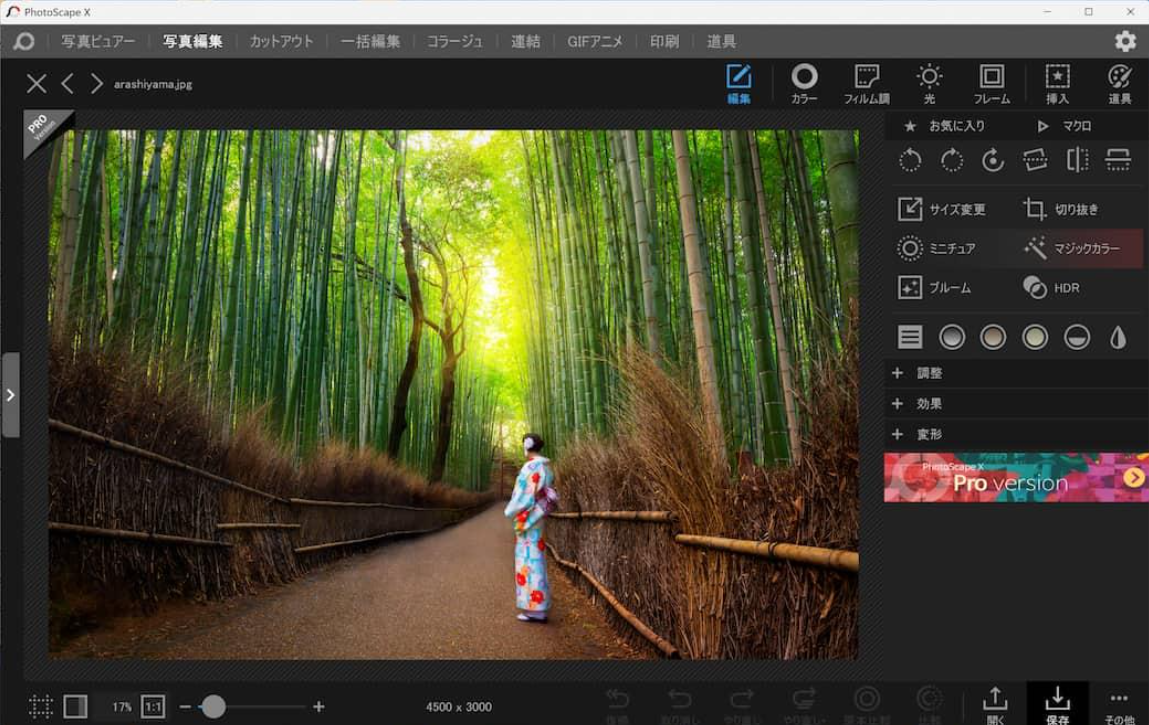
Editing photos does not always require professional design software. Sometimes, the goal is much simpler: resize product images, improve photo colors, remove a background, or combine several pictures into a single graphic.
PhotoScape X is a desktop photo editor built around these everyday tasks. It brings together image adjustments, batch processing, background removal, collage creation, animated GIFs, and other useful tools in one application.
But is PhotoScape X the right choice for your workflow? In this review, we examine its main features, practical uses, potential limitations, and the types of users who may benefit most from it.
1. What Is PhotoScape X?
PhotoScape X is a desktop image-editing application developed by Mooii Tech. It is available for Windows and macOS, with features covering photo correction, creative effects, image organization, and batch processing.
Unlike software designed primarily for complex graphic design, PhotoScape X focuses on making common image tasks accessible from a single interface.
For example, someone preparing images for a blog might need to crop a photograph, adjust its brightness, add a border, and resize it before uploading. A small online shop might need to process dozens of product pictures in a similar way.
PhotoScape X brings many of these operations together, reducing the need to switch between separate tools.
The application offers free and paid Pro options. The availability of individual features can depend on the edition and operating system, so it is worth checking the current product listing before choosing a version.
2. Key Features of PhotoScape X
Photo Editing and Color Correction
PhotoScape X includes common editing tools for improving photographs. Users can crop, rotate, straighten, resize, and adjust the appearance of an image.
Color and lighting controls help users work with brightness, contrast, color temperature, white balance, and other visual properties. Filters, frames, and effects provide additional options for changing the look of a picture.
These tools are useful when a photograph needs straightforward corrections rather than extensive professional retouching.
Practical example: A blogger could brighten a photograph taken indoors, crop out distracting areas, and resize it to fit an article layout. A product seller could make a collection of images look more consistent before publishing them.
The main advantage is convenience. Common adjustments are available in one desktop application without requiring a separate tool for every small task.
Background Removal and Cutout Tools
PhotoScape X includes a Cut Out section with selection tools such as Magic Eraser, Lasso, and Brush.
These tools can help separate a subject from its background. Possible uses include preparing product photographs, creating profile images, and making simple promotional graphics.
However, background removal is not always straightforward. Images with complicated hair, fine branches, transparent objects, or similar colors between the subject and background can require additional work.
For a simple product photograph against a plain background, the process may be relatively manageable. For a detailed portrait or a complex commercial image, the result may need careful manual correction.
Users should also check whether the specific cutout features they need are included in their chosen edition.
Batch Editing for Multiple Images
Batch processing is one of PhotoScape X’s most practical features for people who work with images regularly.
Instead of editing each picture separately, users can apply supported operations to multiple files in one workflow.
Depending on the available tools and selected settings, common tasks include:
- Resizing multiple images to consistent dimensions.
- Converting groups of images to another supported format.
- Applying selected adjustments or effects.
- Renaming image files in batches.
- Preparing image collections for websites or other publishing platforms.
Consider a website owner who needs to publish 30 photographs. Processing every file individually can become repetitive, especially when the same resizing or formatting steps must be repeated.
Batch editing can reduce that repetition and help make the results more consistent.
It is still important to review the output. An adjustment that works well on one photograph may not look equally good on every image in a group.
Collage and Image Combination
PhotoScape X offers both collage and image-combination tools.
The Collage feature allows multiple pictures to be arranged within a layout. The Combine feature can join images into a larger image, including horizontal or vertical arrangements.
These functions can be useful for:
- Before-and-after comparisons.
- Product collections.
- Photo summaries for blog posts.
- Social media graphics.
- Tutorials